The Energy Add-on: Wells, Pipelines, Operators, and Crown Tenure by Legal Land Description
See the wells, pipelines, facilities, operators, production, and Crown tenure on any quarter section in Alberta, Saskatchewan, BC, and Manitoba.
The Energy add-on (shown as the Energy Bundle in some parts of the app) turns a legal land description into a picture of everything energy-related on that land. Search a quarter section or LSD and you see the wells on it, who operates them, which pipelines cross it, what it produced over the last year, and which Crown leases cover it and when they expire.
This guide explains what the add-on unlocks, what each piece means, and how to use it. For a tour of the whole report panel, see The Parcel Report Sidebar.
Who it is for
- Landowners who want to know which wells are on their land, who is responsible for them, and whether any are orphaned.
- Land agents and landmen who need the licensee, the Crown tenure holder, and the expiry date before they make a call.
- Surface-rights consultants checking which wells, pipelines, and facilities touch a parcel. See surface rights.
- Environmental and liability analysts sizing closure exposure across a parcel or an operator. See energy liability.
- Acquisitions teams screening an operator's footprint and tenure position. See oil and gas.
What the add-on unlocks
With the Energy add-on on your account, you get:
- The Energy tab on every parcel report.
- The energy questions on the report Overview, such as "Are there well liabilities here?" and "Who holds tenure or mineral interests?"
- Energy events on the Activity timeline: well licences, drilling milestones, Crown tenure issues, upcoming expiries, and the last month the land recorded production.
- Operator drill-downs and the operator directory.
- The expiring tenure watchlist.
- Six gated energy map layers and the energy map presets.
- The Energy Report PDF.
- Energy questions in the AI Assistant, and energy detail in parcel reports read through ChatGPT and Claude.
The add-on stacks on a Pro or Business plan. It is not available on Starter. First-time buyers get a 7-day free trial. See pricing for current prices.
What each piece means
Wells
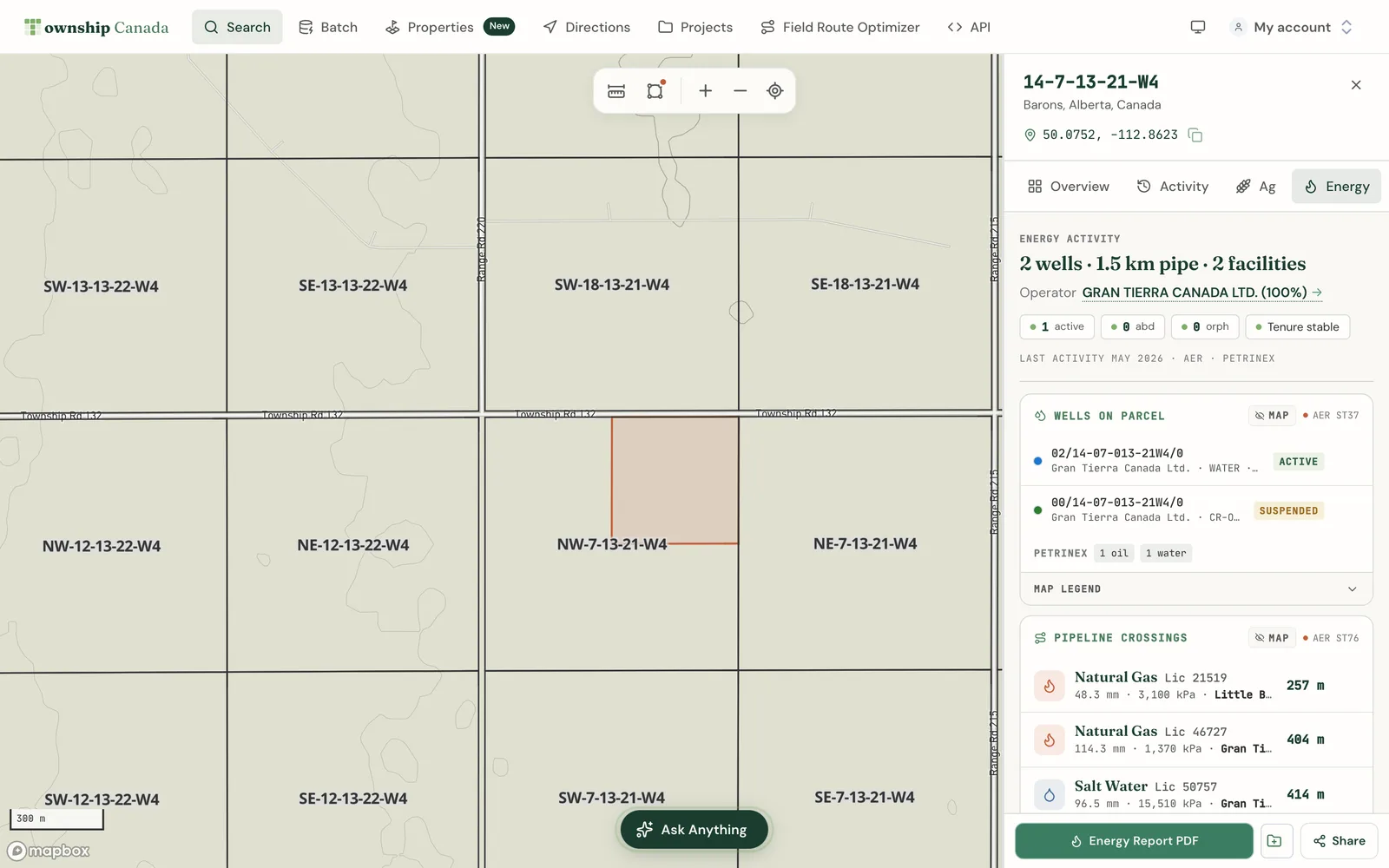
The Wells card lists every well on the parcel with its unique well identifier (UWI), operator, fluid, total depth, and status. The status summary at the top of the Energy tab counts wells by lifecycle:
- Active: producing or able to produce. The licensee operates the site.
- Suspended: not producing, but the licensee still holds the licence and is responsible for it.
- Abandoned: plugged and closed. The licence is no longer active.
- Orphan: the licensee can no longer meet its closure obligations, and the well is in the Orphan Well Association inventory.
Abandoned is a regulatory state. Orphan is a financial one. A well can be abandoned and still be someone's responsibility. For more, read AER wells lifecycle status and orphan and abandoned wells.
Click a well row to fly the map to it, or open the well for its full detail.
Pipelines
The Pipelines card lists each pipeline segment that crosses the parcel, with its substance, licence number, status, pressure, H2S level, and length. Consecutive crossings from the same licence are grouped so you can see one line crossing the parcel more than once. Source details are in AER ST76 pipelines.
Facilities
The Facilities card lists licensed sites on the parcel, such as batteries, gas plants, and compressors. Alberta's many facility sub-codes are grouped into eight plain categories. See the eight facility categories.
Operators
The Operators card names who operates the wells on the parcel and marks the dominant operator, which is the licensee with the most wells there. Open an operator to see its full footprint: active, suspended, abandoned, orphan, and reclaimed counts, plus its Crown dispositions and well list. Operator snapshots are deepest in Alberta, where they come from the AER's Business Associate register. See AER ST101 BA snapshot.
Production
The Production card shows oil, gas, water, and condensate volumes over the trailing 12 months, and how many wells produced. Volumes come from Petrinex public reports for Alberta and Saskatchewan and from the BC Energy Regulator for British Columbia. See Petrinex volumetrics. For Alberta and Saskatchewan parcels, a Drought vs production card also shows how basin production splits across current drought classes.
Crown tenure
The Tenure card lists the Crown petroleum and natural gas (PNG) agreements and Crown mineral agreements that cover the parcel. Each one shows its disposition number, type, holder, status, expiry date, days to expiry, and how much of the parcel it covers. Agreements expiring within 24 months are flagged. Open a disposition for its full detail.
A few provincial gaps to know about:
- Saskatchewan PNG agreements publish no expiry date, so days to expiry stays empty there.
- British Columbia PNG agreements publish no holder name, so the disposition number is shown instead.
Read Crown PNG tenure and Crown mineral tenure for what each province publishes.
Find the wells on your land
- Type your legal land description in the search box, for example
NW-36-42-3-W5, and select the parcel. - Open the Energy tab in the report sidebar.
- Read the status summary for well counts by status and the dominant operator.
- Scroll to the Wells card for each well, its operator, and its status.
- Click a well to see it on the map.
Look up who operates a well
- Open the parcel report and go to the Energy tab.
- In the Operators card, select an operator.
- Read its liability snapshot, then open its wells, dispositions, or footprint tables.
- Use the back arrow in the breadcrumb to return to the parcel.
To browse operators without a parcel, select All operators directory at the bottom of the Operators card. You can also browse public operator pages at oil and gas operators.
Check when Crown tenure expires
- Open the parcel report and go to the Energy tab.
- Read the Tenure card for each agreement's holder and expiry.
- Select Province-wide expiring watchlist to see agreements coming due across the province.
- Set the window to the next 90 days, 180 days, 12 months, or 24 months, and choose PNG, mineral, or both.
- Select Show on map on any row to see where it is.
Energy map layers
In the Layers panel, the Energy add-on unlocks Pipelines, Facilities, O&G Activity (LSD), LSD Production (12mo), Petroleum Tenure, and Mineral Tenure. The Wells and Fields & Pools layers are free on any paid plan, so you can see wells on the map without the add-on. The report lists, operators, and tenure detail need it.
The add-on also unlocks four presets: production, liability, tenure, and minerals. The Map Layers guide explains how to turn layers on, recolour them, and use presets. The same energy layers appear in the mobile apps when your account holds the add-on.
Export a PDF
From the Energy tab, select the PDF button in the sidebar footer to build the Energy Report PDF. It carries the energy sections with their sources and a short written analysis. If you also hold the Agriculture add-on, the Overview and Activity tabs build one combined PDF.
Provincial coverage
| Data | AB | SK | BC | MB |
|---|---|---|---|---|
| Wells | yes | yes | yes | yes |
| Pipelines, facilities, 12-month production | yes | yes | yes | no |
| Crown PNG and mineral tenure | yes | yes | yes | yes |
| Orphan and abandoned flags | yes | yes | yes | no |
Manitoba does not publish per-well production, so the report says the data is not available rather than showing a zero. British Columbia is not on the DLS grid, so its reports run on NTS and ParcelMap BC parcels.
Frequently asked questions
Which provinces does the Energy add-on cover?
Alberta, Saskatchewan, British Columbia, and Manitoba. Wells and Crown tenure cover all four. Pipelines, facilities, and production cover Alberta, Saskatchewan, and British Columbia. Coverage is deepest in Alberta.
How fresh is the data?
Wells, pipelines, facilities, production, and orphan flags refresh monthly. Crown PNG and mineral tenure refresh weekly. Alberta operator codes refresh quarterly. Each card shows its source. For the full list of sources, see parcel intelligence data sources.
What counts as a report?
One report is one parcel's Energy intelligence in one month. The Energy tab, its cards, the drill-downs, and the PDF for that parcel all count as one report. Reloading a report you already opened, browsing the map, and retries do not count again. An LSD counts as the quarter section that contains it. The add-on includes 100 reports per month. If you hold both the Agriculture and Energy add-ons, reports count against the combined allowance.
What happens when I reach the allowance?
There are no overage charges. Parcels you already opened this month stay available at no extra cost. Your Account page shows your usage and the reset date. If you need more reports every month, contact us about Enterprise.
Related guides
- The Parcel Report Sidebar: every tab in the report panel
- Map Layers: paint energy data across the grid
- Oil and gas by region: operators, fields, and activity
- Oil and gas fields
- Orphan well due diligence
- AER ST37 wells
- Well closure tools
Related Guides
Agriculture Add-on: Soil Ratings, Crop History, and Productivity Scores by Quarter Section
What the Agriculture add-on unlocks: Productivity Score, LSRS and CLI ratings, soil, 5-year crop history, land use, drought, and flood per quarter section.
AI Assistant - Ask Questions About Legal Land Descriptions
Use Township Canada's AI Assistant to convert legal land descriptions, get directions, validate formats, ask about a parcel's wells, soil, crops, and flood history, and learn about DLS, NTS, and Geographic Township systems through natural conversation.
Batch Convert Legal Land Descriptions - 5,000+ Records
Convert thousands of legal land descriptions to GPS coordinates and vice versa in seconds. Export to CSV, KML, Shapefile, DXF, or GeoJSON. Perfect for oil & gas, real estate, GIS, and agriculture.