AI Assistant - Ask Questions About Legal Land Descriptions
Use Township Canada's AI Assistant to convert legal land descriptions, get directions, validate formats, ask about a parcel's wells, soil, crops, and flood history, and learn about DLS, NTS, and Geographic Township systems through natural conversation.
Get instant answers about legal land descriptions and the land behind them. Township Canada's AI Assistant understands Canadian survey systems. It can convert locations, explain formats, get directions, and answer questions about a specific parcel using the same data as the parcel report, all through natural conversation.
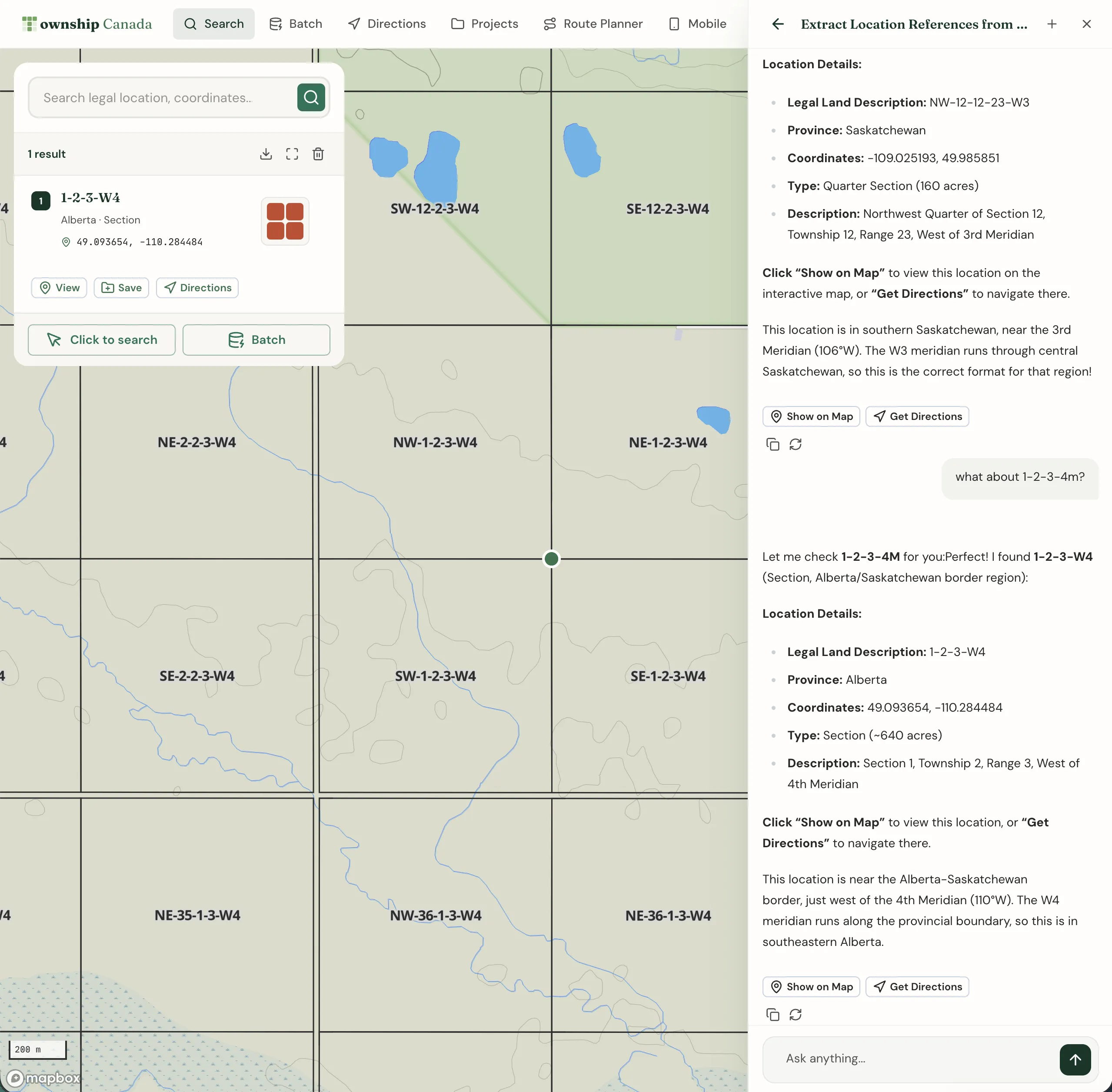
What can the AI Assistant do?
The AI Assistant is built specifically for Canadian legal land descriptions. It can:
- Convert locations - Enter a legal land description, GPS coordinates, address, or postal code and get instant results
- Explain formats - Break down what each component of a DLS, NTS, or Geographic Township description means
- Validate descriptions - Check if a legal land description is valid and identify any errors
- Get directions - Calculate routes between locations using legal land descriptions
- Plan routes - Optimize multi-stop routes for efficient travel between sites
- Batch convert - Convert multiple locations in a single request
- Answer parcel questions - With the Energy or Agriculture add-on, ask about a parcel's wells, operators, tenure, soil, crops, drought, or flood history, then open the full parcel report or its PDF in one click
- Answer questions - Explain Township Canada features, subscription plans, and export options
Opening the AI Assistant
The AI Assistant is available from any page in the app. Click Ask Anything at the bottom of the screen (or Ask on your phone) to open the assistant panel. Any paid plan includes the assistant.
The suggestions you see depend on where you are. With a parcel report open, they are about that parcel, and you can say "this parcel" or "this land" instead of typing its legal land description.
Converting locations
Ask the assistant to convert any location format. It understands natural language, so you don't need to use exact syntax.
Example prompts:
- "Where is SW 25 24 1 W5?"
- "Convert 51.454928, -114.648933 to a legal land description"
- "Find the coordinates for A-2-F/93-P-8"
- "What LLD is 123 Main Street, Calgary?"
- "Look up postal code T2P 1J9"
The assistant returns coordinates, the legal land description, and province. Buttons appear with each result so you can view the location on the map or get directions to it.
Understanding legal land descriptions
The assistant can explain any component of a legal land description. This is useful when you encounter an unfamiliar format or need to understand what each part means.
Example prompts:
- "What does SW 25 24 1 W5 mean?"
- "Explain the NTS system"
- "What is an LSD?"
- "How are sections numbered in a township?"
- "What's the difference between DLS and NTS?"
Validating descriptions
Before converting, the assistant checks that each component falls within valid ranges. If something is off, it explains the issue and suggests corrections.
Example prompts:
- "Is LSD 17 25 24 1 W5 valid?" - The assistant flags that LSD must be between 1 and 16
- "Check section 37 24 1 W5" - Section must be between 1 and 36
- "Validate NE 10 48 2 W5"
Getting directions
Ask the assistant for driving directions between any two locations. Locations can be legal land descriptions, addresses, coordinates, or a mix.
Example prompts:
- "How do I get from Calgary to SW 25 24 1 W5?"
- "Directions from NE 10 48 2 W5 to SE 15 48 2 W5"
- "How far is Olds, Alberta from 7-25-24-1-W5?"
The assistant returns distance, estimated travel time, and turn-by-turn instructions. Click See it on Google Maps for voice-guided navigation.
Planning multi-stop routes
When you have multiple locations to visit, the assistant can help you plan an efficient route.
Example prompts:
- "Plan a route visiting SW 25 24 1 W5, NE 10 48 2 W5, and SE 15 48 2 W5"
- "What's the best order to visit these 5 well sites?"
Batch conversion
Convert multiple locations in a single message. List the descriptions separated by commas or on separate lines.
Example prompts:
- "Convert these locations: SW 25 24 1 W5, NE 10 48 2 W5, SE 15 48 2 W5"
- "Batch convert 7-25-24-1-W5, 8-25-24-1-W5, 9-25-24-1-W5"
Asking about a parcel
With the Energy or Agriculture add-on, the assistant answers questions about a specific parcel using the same data as the parcel report's Energy and Ag tabs. While it works, you'll see what it is looking up.
Example prompts (Energy add-on):
- "How many wells are on 7-25-24-1-W5, and who operates them?"
- "Who operates the wells on 7-25-24-1-W5, and what is their liability record?"
- "Which Crown leases on 14-3-50-7-W4 expire soonest?"
- "Which leases expire in the next 90 days?"
Example prompts (Agriculture add-on):
- "How productive is NW-11-5-6-W2, and what limits it?"
- "What crops have been grown on SW-25-24-1-W5?"
- "What's the flood history of NW-11-5-6-W2?"
- "How does this land compare with the rest of the county?"
Energy data is kept per LSD, so energy questions need an LSD (like 7-25-24-1-W5). Agriculture questions take a quarter section, or an LSD, which is answered for its quarter.
After a parcel answer, click Open parcel report to jump to that parcel's report on the matching tab, or Report PDF to open a printable report you can download. Each parcel you ask about counts as one parcel report for the month, the same as opening it in the app; asking again about a parcel you've already opened that month is free.
On the parcel report's Overview tab, the Ask about this land chips send a ready-made question about the parcel you're viewing.
Asking about features
The assistant knows Township Canada's features, plans, and capabilities. Ask it anything about the platform.
Example prompts:
- "What export formats are available?"
- "How do I create a project?"
- "What's the difference between Pro and Business?"
- "How does team management work?"
- "Can I use the API to convert locations?"
Tips for better results
Be specific with provinces
When entering abbreviated descriptions, include the province or meridian for accurate results:
- Instead of "33 38 18 2", try "33 38 18 W2" or mention "Saskatchewan"
- The assistant infers meridians from province context when possible
Use natural language
You don't need to memorize exact formats. The assistant understands variations like:
- "section 25, township 24, range 1, west of the 5th meridian"
- "SW quarter of 25-24-1 W5"
- "LSD 7 of section 25"
Follow up on results
After a conversion, you can ask follow-up questions:
- "Show me that on the map"
- "What section is that in?"
- "Get directions there from Calgary"
- "Who operates the wells there?" (Energy add-on)
Plan availability
| Feature | Starter | Pro | Business and Enterprise |
|---|---|---|---|
| Daily messages | 30 | 200 | Unlimited |
| Find locations (LLD, coordinates, address) | Yes | Yes | Yes |
| Format checks and feature help | Yes | Yes | Yes |
| Get directions | Yes | Yes | Yes |
| Convert a list (up to 20) | - | - | Yes |
| Multi-stop route planning | - | - | Yes |
| Parcel questions (energy, agriculture) | - | With add-on | With add-on |
Related guides
- Township Canada in ChatGPT and Claude - Connect your account to an external AI app or use the Township Canada plugin
- Search & Convert Locations - Convert locations using the search box
- The Parcel Report Sidebar - Everything in a parcel report, and its PDF
- Get Directions - Full directions interface with map display
- Batch Conversion - Convert thousands of records at once
- Route Planner - Multi-stop route optimization tool
Related Guides
Batch Convert Legal Land Descriptions - 5,000+ Records
Convert thousands of legal land descriptions to GPS coordinates and vice versa in seconds. Export to CSV, KML, Shapefile, DXF, or GeoJSON. Perfect for oil & gas, real estate, GIS, and agriculture.
Township Canada in ChatGPT and Claude
Add the published Township Canada community connector in Claude, connect ChatGPT over MCP, and use the plugin to convert land descriptions and read parcel reports.
Using Township Canada for Delivery & Field Route Planning
Plan efficient delivery routes and field visits using legal land descriptions. Convert LSD lists from spreadsheets, visualize stops on a map, and get driving directions.