Agriculture Add-on: Soil Ratings, Crop History, and Productivity Scores by Quarter Section
What the Agriculture add-on unlocks: Productivity Score, LSRS and CLI ratings, soil, 5-year crop history, land use, drought, and flood per quarter section.
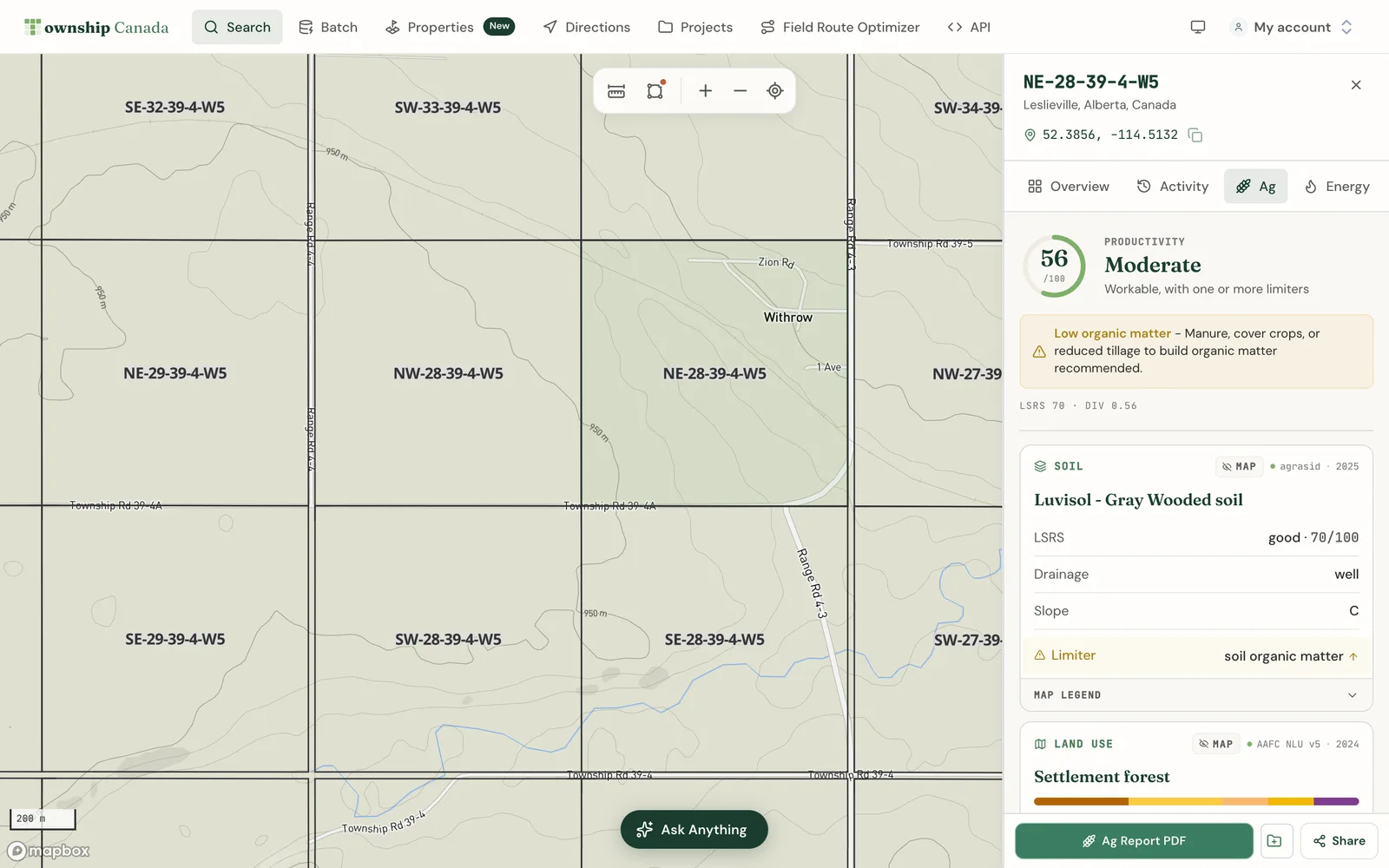
The Agriculture add-on (shown in the app as the Agriculture Bundle) turns a legal land description into an agronomic report. Look up a quarter section and you get its soil rating, capability class, five years of crop history, land use, current drought status, and flood susceptibility, all on one tab and in one PDF. This guide explains what each piece of data means, how to use it in the web app, and when the add-on is the right buy.
Who it is for
The add-on is built for people who make decisions about farmland by the quarter section:
- Farmers and agronomists checking soil, rotation, and drought on their own or rented land.
- Ag lenders screening the land behind a loan.
- Farmland buyers and investors comparing quarters before an offer.
- Rural appraisers gathering soil and crop evidence for a file.
It stacks on a Pro or Business plan. Starter plans cannot add it. See pricing for current prices.
What it unlocks
- The Ag tab in the parcel report sidebar, with the full agronomic report for the quarter section.
- Crop and drought events on the Activity tab timeline.
- The Ag Report PDF, a branded report you can download, print, or send.
- The agriculture map layers: Ag Summary, AAFC Crops, Soil Survey, Ag Capability (AB and BC), SK Crown Land, SK Pastures, and the BC Agricultural Land Reserve, plus the BC Wetlands sub-layer.
- The How does this land compare? chip, which asks the AI Assistant about the parcel you have open.
The iOS and Android apps carry the same agriculture map layers, unlocked by the same add-on.
What each piece of data means
Productivity Score (0 to 100)
The Productivity Score is a Township Canada composite, not a government rating. It combines three inputs:
- 50% soil: the LSRS score where Alberta publishes one, otherwise an estimate from the soil order and group.
- 30% capability: the CLI class, converted so class 1 scores highest.
- 20% crop diversity: how varied the last five years of crops were.
The total is then reduced slightly if the parcel is in drought this month. Scores are banded from Very Low to Very High, and the tab names the single limiter holding the score down. Use it to rank and compare parcels. It is not an appraisal value, a yield forecast, or a substitute for a soil test. The full formula is in the Productivity Score methodology.
LSRS rating (Alberta)
The Land Suitability Rating System rates dryland spring-cereal productivity on a 0 to 100 scale, with a limiter such as climate, moisture, or soil. Township Canada reads it from AGRASID 4.1, Alberta's soil database. See AGRASID and LSRS and how to read an LSRS score.
CLI land capability
The Canada Land Inventory places land in seven classes, from class 1 (no significant limitations) to class 7 (no capability for arable culture). A letter code explains the main limitation, for example M for moisture or T for topography. CLI mapping is decades old, so read it as one input, not the final word. See CLI Land Capability.
Soil
The soil card shows the soil order, group, and subgroup, with drainage and slope. In Alberta this comes from AGRASID. Elsewhere it comes from provincial soil survey data or the national Soil Landscapes of Canada, and the score is labelled as an estimate. For when to use which, read Soil Landscapes of Canada vs. LSRS.
Five-year crop history
From the AAFC Annual Crop Inventory, a satellite crop map, you get the crop grown on the quarter each of the last five years, the dominant crop, and a diversity index that rewards a varied rotation over a monoculture. See AAFC crop history per quarter section.
Land use
The AAFC land-use class tells you whether the quarter is mostly cropland, grassland, forest, wetland, water, or settlement. See AAFC Land Use.
Drought
The current Canadian Drought Monitor class for the quarter, on the D0 (abnormally dry) to D4 (exceptional) scale, with the date it is valid for. It refreshes monthly. See Canadian Drought Monitor.
Flood susceptibility and wetlands
The flood card shows how many acres of the quarter score 50 or higher on NRCan's flood susceptibility maps, with a year-by-year chart from 2000 to 2023. Open water is reported separately. It is a screening signal, not a flood hazard map. See NRCan Flood Susceptibility. The wetlands card shows mapped wetland area, open water, and the nearest watercourse and water body within 500 m.
Get the add-on
- Sign in on a Pro or Business plan.
- Go to Account and find Parcel report add-ons.
- Select Add Agriculture Bundle and complete checkout.
First-time buyers get 7 days free. You can also start from pricing, or from any locked Ag tab or locked layer, which opens the same upgrade path.
Read a quarter section
- Search a legal land description, such as
NW-11-5-6-W2, or click a quarter section on the map. - In the sidebar, select the Ag tab.
- Read the Productivity Score and its limiter first, then work down the soil, land use, crop history, climate, wetlands, drought, and flood cards.
- Open the Activity tab to see the crop grown each year and changes in drought class on a timeline.
- Select the PDF button on the Ag tab to build the Ag Report PDF, or use Share to copy a link to the report.
If you search an LSD, the report covers the quarter section that contains it.
Scan an area with map layers
To compare many quarters at once, open the Layers panel and turn on Ag Summary in the Agriculture category. Its View switcher repaints the same layer by LSRS, CLI, crop, drainage, land use, diversity, and other properties. AAFC Crops shows the crop map itself. The Map Layers guide covers the panel, legends, and views. For a worked example, see find top-LSRS farmland in Alberta.
Browsing layers does not count toward your report allowance. Only opening a parcel's report does.
How reports are counted
The add-on includes 100 parcel reports per month.
- One report is one quarter section in one calendar month.
- The Ag tab, the Activity entries, and the PDF for that quarter are the same report.
- Reopening, reloading, or switching tabs on a quarter you already opened this month never counts again.
- Reports opened in the mobile app or through the AI Assistant draw on the same allowance.
Your Account page shows how many reports you have used this month and when the count resets.
When it is the right buy
The add-on fits when your work is a steady stream of individual quarters: checking land before a purchase, a loan, an appraisal, or a rental agreement. The farmland due diligence walkthrough shows a typical pre-closing review.
It is the wrong fit when:
- You need wells, pipelines, and Crown tenure. That is the Energy add-on. If you need both, the Agriculture + Energy add-on covers both on one allowance.
- You score thousands of parcels a month. Bulk enrichment belongs on Enterprise.
- You want the data in your own software. The Parcel Intelligence API is a separate subscription; see pricing.
Before you buy, the free farmland pages show Alberta crops, soils, and farmland by municipality, and the agriculture industry page lists every data source. What the add-ons measure explains which figures are source data and which are derived.
FAQ
Which provinces does it cover?
Alberta, Saskatchewan, and Manitoba on the DLS quarter-section grid, and British Columbia through ParcelMap BC parcels. Alberta has the most complete picture, including the LSRS rating and AGRASID soil detail. In Saskatchewan and Manitoba, crop history, land use, CLI, and drought are all present, and the Productivity Score is an estimate built on national soil data. Saskatchewan also gets the Crown land and pasture layers. British Columbia parcels get their own Ag tab with the Agricultural Land Reserve, BC's 7-class Agriculture Capability rating, soil survey, and wetlands.
What counts as one report?
Opening one quarter section's agriculture report for the first time in a calendar month. Everything for that quarter that month, including the PDF and repeat visits, is part of the same report. Browsing the map and its layers does not count.
What happens when I reach 100 reports?
There are no overage charges. Quarters you already opened this month stay available at no extra cost. Your Account page shows your usage and when it resets. If you regularly need more, talk to us about Enterprise.
Is the Productivity Score an appraisal?
No. It is a ranking signal built from public data to help you compare parcels. Cite the source ratings (LSRS, CLI, crop history) and confirm with a soil test or site visit before a final decision.
How current is the data?
Crop, soil, and capability data refresh annually. Drought refreshes monthly. Each card names its source.
Related guides
- The Parcel Report Sidebar: every tab, the PDF, and sharing
- Map Layers: turn on and recolour the agriculture layers
- AI Assistant: ask follow-up questions about a parcel
- Productivity Score methodology
Related Guides
AI Assistant - Ask Questions About Legal Land Descriptions
Use Township Canada's AI Assistant to convert legal land descriptions, get directions, validate formats, ask about a parcel's wells, soil, crops, and flood history, and learn about DLS, NTS, and Geographic Township systems through natural conversation.
Batch Convert Legal Land Descriptions - 5,000+ Records
Convert thousands of legal land descriptions to GPS coordinates and vice versa in seconds. Export to CSV, KML, Shapefile, DXF, or GeoJSON. Perfect for oil & gas, real estate, GIS, and agriculture.
Township Canada in ChatGPT and Claude
Add the published Township Canada community connector in Claude, connect ChatGPT over MCP, and use the plugin to convert land descriptions and read parcel reports.