Property Packages: Farmland Listing and Rural Appraisal Reports by Legal Land Description
Group a farm's quarters and LSDs into one property, run Agriculture and Energy data on every block, and download a branded, client-ready PDF package.
A farm listing or appraisal file rarely covers one quarter section. A property on Township Canada groups a farm's quarters and LSDs into one named record. You run one report over the whole property, then build a client-ready PDF package from it. For who it is built for, see property packages for land brokers and rural appraisers.
What you need
- Creating and editing properties is open on Pro and Business.
- Running the report needs an Agriculture or Energy add-on. The section you do not hold shows as locked.
- The Real Estate add-on (Business only) includes Agriculture and Energy data, a larger allowance, your branding, per-block aerial pages and the PNG and CSV zip.
On Pro, properties are saved to your Quick Saves or Boundaries project. On Business you can also pick or create a custom project. See pricing.
Create a property
Open Properties in the app navigation. A first visit shows two ways to start: Draw it on the map and Paste a list.
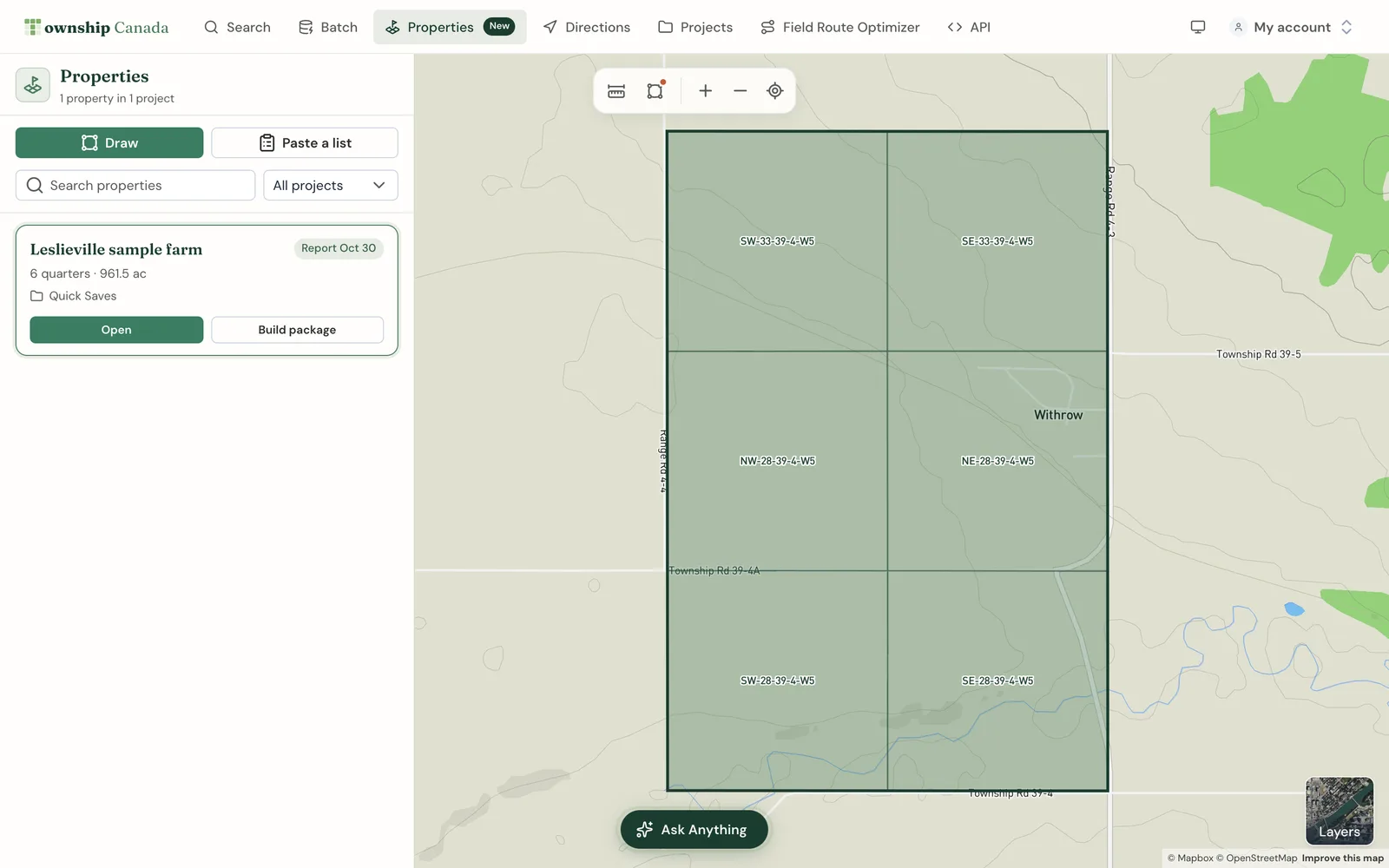
Draw it on the map
- Select Draw it on the map.
- Click each corner of the land on the map, then double-click to finish.
- The outline snaps to quarter sections. Quarters on the edge of your outline are flagged: click one on the map to include or drop it.
- Check the quarters and acres under Snapped to quarters.
- Enter a Name, choose a Project, and select Create property.
Use Redraw to start again. You can also use the Draw tool anywhere on the map: once the outline closes, the boundary sidebar offers Create a property.
Paste a list
- Select Paste a list.
- Paste blocks from a title, listing or spreadsheet into Quarters and LSDs, one per line. Formats like
NW-22-50-25-W3,SE 28-50-25 W3and10-36-42-3-W5all work. - The list is read as you type and previewed on the map. Sections and half sections split into quarters.
- Check the list. Lines left out show why, such as "Listed twice" or "Inside a quarter already listed".
- Enter a Name, choose a Project, and select Create property.
A pasted list takes up to 100 blocks. On Business, batch results also have a Create property button.
Land in more than one piece
If the blocks form separate groups, the create form says how many it found. Choose Keep as one property or Split into N properties. Road allowances between quarters do not split a property.
Edit the blocks
In the Blocks tab, owners and editors can add or remove blocks and enter title acres for any block, for example a tender parcel made of part of an LSD. Entered acres are marked user-entered and replace the mapped acres in totals. Download block list (CSV) exports the list.
The property workspace
A property opens in a sidebar next to the map, with Overview, Blocks, Location, Aerial, Land profile, Energy and Method tabs. Land profile covers acres by use, soil capability, crops and drought. Energy covers wells, orphan wells, pipelines, facilities, operators and Crown dispositions. Method explains how each figure is measured, with sources and as-of dates. Each data block has a CSV export and each figure a PNG export.
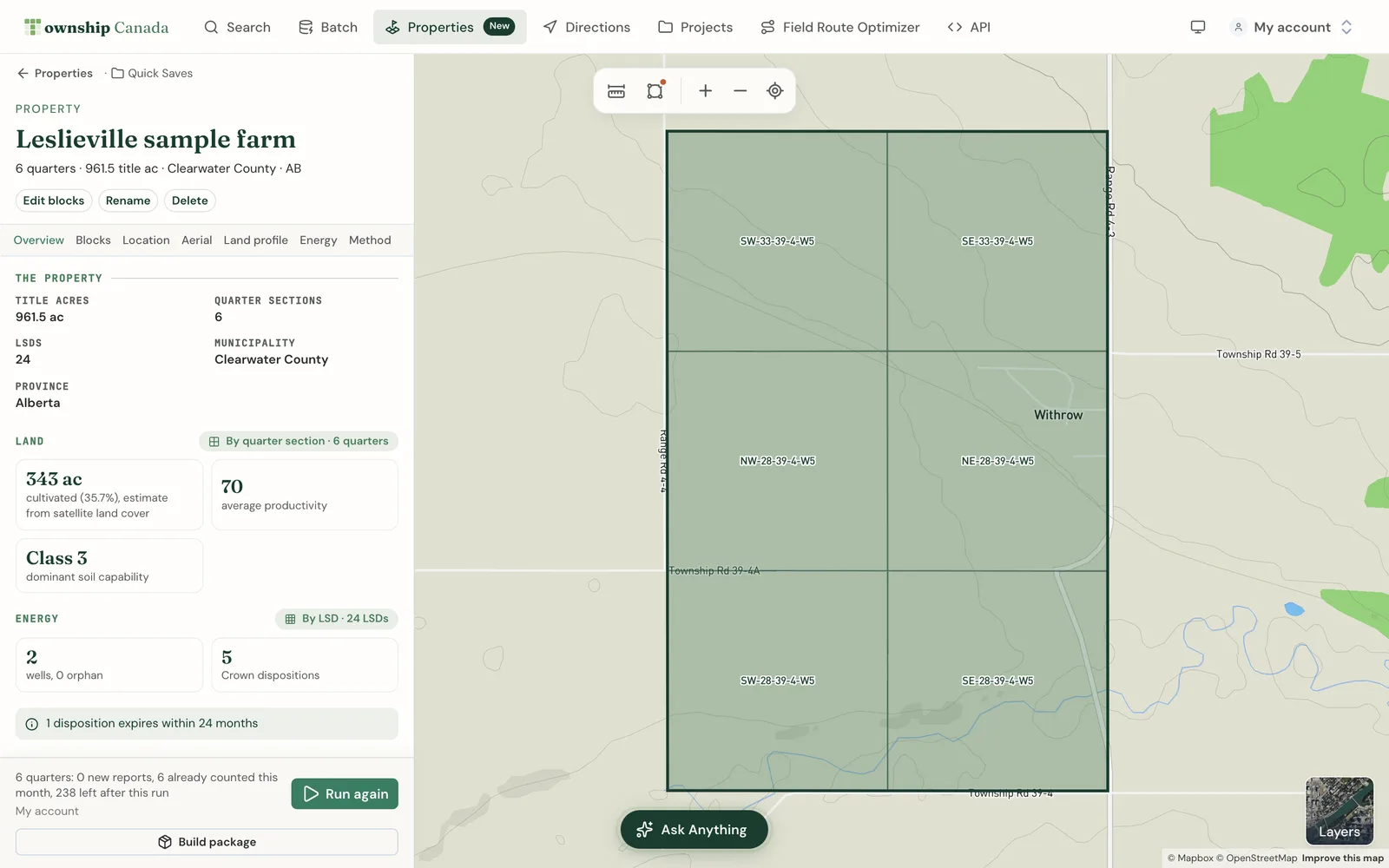
Run the report
Select Run report in the run bar at the bottom of the sidebar. One run reads every block, and each section states its unit:
- Agriculture (land use, soil, crops, drought, productivity) is read by quarter section. A property made only of LSDs gets agriculture from the quarters those LSDs sit in, and says so.
- Energy (wells, pipelines, facilities, operators) is read by LSD. A quarter counts as its four LSDs.
- Crown tenure is read by disposition, from the dispositions that touch the property outline.
You never pick a grain. Acres by use are estimates from AAFC satellite land cover, scaled to title acres. They are not a survey and not assessed acres.
How runs are metered
A property run uses the same meter as a single parcel report:
- One report per quarter section, per calendar month. An LSD counts as the quarter it sits in.
- A quarter already counted this month is free. That includes a quarter counted by an earlier run, or by opening its parcel report.
- Re-opening a property, exporting and printing packages never count.
Before you run, the run bar shows how many quarters are new reports, how many are already counted this month, and how many you will have left.
The Real Estate add-on includes 250 reports a month on the combined Agriculture and Energy meter. Its allowance is its own and is not added to another add-on's allowance. Self-serve plans never bill overage. If you need more each month, talk to us about Enterprise.
Snapshots
Each run is stored as a snapshot: per-block results, property totals and methodology, with as-of dates. The tabs and every package read the latest snapshot, which is why opening or printing does not count again. The run bar shows when the report last ran and who ran it.
- Run again builds a new snapshot, metered per quarter as usual.
- If you edit the blocks after a run, you see Blocks changed since the last run. Run the report again. This is a warning only: the package still prints, with maps and the block table from the current blocks and figures from the last run.
- After some product updates, an older snapshot needs a fresh run before it prints. The sidebar says Run the report again to update it.
Build the package
- Select Build package in the run bar.
- Set the Package title.
- With the Real Estate add-on, enter your Firm name and select Upload logo. The logo must be a PNG or JPEG under 200 KB. Your branding is saved for your next package.
- Pick the pages: cover and summary, location map, route map, block map, aerial of the whole property, land profile and per-block table (Agriculture data), energy and interests (Energy data), and methodology. The Real Estate add-on adds one aerial page per block, for the first 30 blocks.
- Select Download PDF. With the Real Estate add-on, select PNG + CSV (.zip) for the maps as images and the tables as spreadsheets, ready for a listing site.
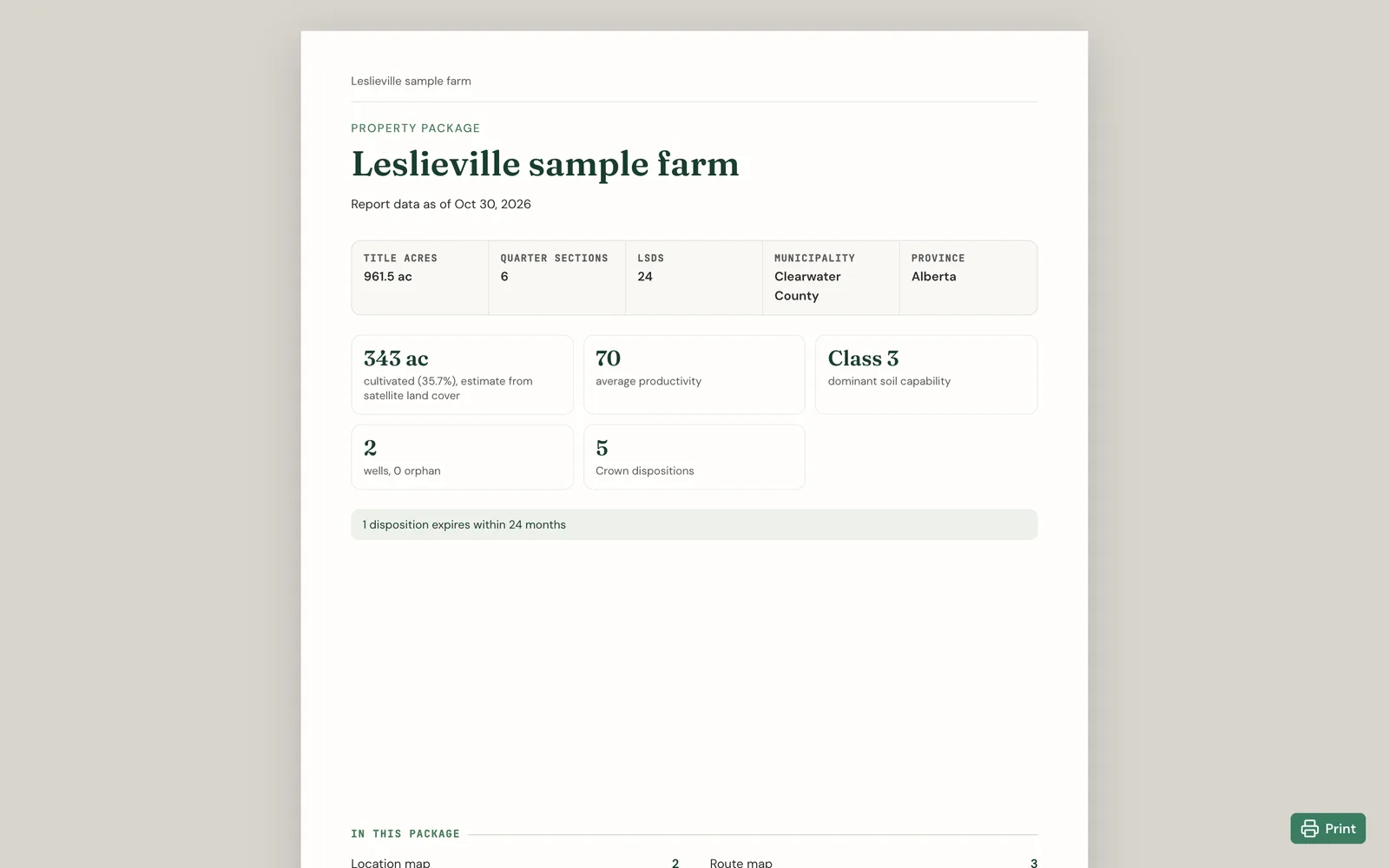
Packages print from your last report run and do not use reports. A page the package cannot print shows why, such as "Needs the Energy add-on".
The Methodology page lists what the package does not include: land titles, assessment (SAMA) values, taxes and comparable sales. Get those from the land titles office and the assessment authority.
Share with your team
A property lives in a project, so everyone on it works from the same blocks and report. Owners and editors can edit and run it. Viewers, and members without an add-on, can open the latest snapshot and print its package. A run spends the allowance of the person who runs it. See teams.
Coverage and data limits
Properties are made of Dominion Land Survey quarters and LSDs in Alberta, Saskatchewan and Manitoba. Some data differs by province:
- The productivity score is Alberta only. Saskatchewan soil capability is still reported.
- Saskatchewan does not publish disposition holders or expiry dates.
- Northern Saskatchewan quarters use coarser 2020 AAFC land use. The Method tab names those quarters.
- Where no nearby town is found for the route, the Location tab asks you to pick a starting point.
FAQ
Who can use property packages?
Pro and Business users can create properties. Running the report needs an Agriculture or Energy add-on, and a package prints from a run. The Real Estate add-on, on Business only, adds your branding, per-block aerial pages and the zip. See pricing.
How are quarters counted against my allowance?
One report per quarter section per calendar month. An LSD counts as its quarter. Quarters already counted this month are free, and printing a package never counts.
Can I put my branding on the package, or remove the Township Canada credit?
With the Real Estate add-on, your firm name and logo print on the package. The footer always carries a data credit. Removing the "Township Canada" part of that credit needs an Enterprise agreement with white label; open-data attributions always stay. You can publish package PDFs and images, for example with a tender listing. Republishing per-block data tables or embedding live maps also needs Enterprise. Contact us to discuss it.
Can I re-run a property?
Yes. Run again builds a new snapshot. In the same month, it costs only quarters not yet counted.
Does a package include ownership, title or sale comparables?
No. Packages cover land, energy and location. The Methodology page says what is not included. For appraisal work, see rural appraisal.
Related guides
- The Parcel Report Sidebar: one quarter section in detail
- Projects and Quick Saves: where properties are saved
- Teams: share properties with your organization
Related Guides
Agriculture Add-on: Soil Ratings, Crop History, and Productivity Scores by Quarter Section
What the Agriculture add-on unlocks: Productivity Score, LSRS and CLI ratings, soil, 5-year crop history, land use, drought, and flood per quarter section.
AI Assistant - Ask Questions About Legal Land Descriptions
Use Township Canada's AI Assistant to convert legal land descriptions, get directions, validate formats, ask about a parcel's wells, soil, crops, and flood history, and learn about DLS, NTS, and Geographic Township systems through natural conversation.
Batch Convert Legal Land Descriptions - 5,000+ Records
Convert thousands of legal land descriptions to GPS coordinates and vice versa in seconds. Export to CSV, KML, Shapefile, DXF, or GeoJSON. Perfect for oil & gas, real estate, GIS, and agriculture.