By Township Canada
Ag and Energy API v1 Contract: New Parameters, Endpoints, and Response Formats
The Ag API and Energy API v1 contract adds include= projection, section and collection routes, paginated responses, and a standardized error schema. One breaking change: /energy/activity is now /energy/summary.
You integrated the Energy API a few weeks ago. Your application calls /energy/activity for each LSD in a disposition area, parses the summary, and renders a dashboard. It works. Then one morning the endpoint returns a 404. The URL is correct, the API key is valid, and the same call ran fine last night. The problem is that /energy/activity no longer exists. It is now /energy/summary, and the v1 contract is live.
This post covers what changed in the v1 contract for both the Ag API and the Energy API, why it changed, and how to update your integration. The short version: one endpoint was renamed, several new parameters were added, and every response now follows a predictable shape.
The breaking change: /energy/activity is now /energy/summary
The rename is a one-line URL update. The response schema is unchanged: well counts by status, pipeline and facility rollups, dominant operator, and last activity date. If your code parsed the old response, it still works against /energy/summary with no other changes.
Why the rename: the word "activity" was ambiguous. Some developers expected it to return a time-series of recent activity on the parcel. Others expected a summary of what exists there now. "Summary" describes what the endpoint actually returns: a snapshot of what is on the LSD at query time.
- GET /energy/activity?legal_location=7-10-13-9-W4
+ GET /energy/summary?legal_location=7-10-13-9-W4
If you are calling /energy/activity today, update the URL. The old path returns 404 not_found.
include= projection: request only the sections you need
Both the Ag API and Energy API full report endpoints (/ag/report and /energy/report) now accept an include query parameter. Pass a comma-separated list of section names, and the API returns only those sections. Omitted sections are never queried on the backend, so the response is faster and smaller.
For the Ag API, valid section names are productivity, cropping, soil, land_use, drought, wetlands, hydrology, parcel_context, provincial_detail, and geometry.
For the Energy API: summary, production, tenure, wells, pipelines, facilities, alternative_energy, and geometry.
A crop insurance application that only needs the productivity rating and soil data can request exactly that:
curl "https://developer.townshipcanada.com/ag/report?legal_location=NW-14-39-27-W4&include=productivity,soil" \
  -H "X-API-Key: YOUR_API_KEY"
The geometry section is new. It attaches the parcel boundary as GeoJSON under parcel.geometry in the response. It is never included by default: you must add geometry to the include list explicitly. This is useful if your application renders parcel boundaries on a map and you want the polygon in the same call as the report data, rather than making a second request to the Search API.
Section routes: one endpoint per report section
Before v1, the only way to get a single section of the report (say, just the cropping data for a quarter section) was to call /ag/report and ignore the other sections. That works, but the backend still queries every data source, and you pay for the latency.
The v1 contract adds a dedicated endpoint for each report section:
Ag API section routes:
| Endpoint | Returns |
|---|---|
/ag/productivity | LSRS and CLI scores, classes, and limiters |
/ag/cropping | Dominant crop, category, rotation, and diversity index |
/ag/soil | Soil classification, drainage, slope, and parent material |
/ag/land-use | AAFC land-use class, IPCC classification, and percentage breakdown |
/ag/drought | Canadian Drought Monitor class and assessment date |
/ag/wetlands | Wetland coverage for the parcel |
/ag/hydrology | Nearest watercourse and water body with distances |
/ag/parcel-context | Quarter section context and identifiers |
Energy API section routes:
| Endpoint | Returns |
|---|---|
/energy/summary | Well counts, pipeline and facility rollups, dominant operator |
/energy/production | Trailing 12-month Petrinex volumes |
/energy/alternative-energy | CCS and geothermal tenure |
Each section route takes a legal_location parameter and returns the same data shape as the corresponding section of the full report. If your application needs only one piece of information (the drought class for 200 quarter sections, the production volumes for a set of LSDs), the section route is the right choice. It queries a single data source and returns faster than the full report with include=.
Collection routes: paginated, filterable access to wells, pipelines, facilities, and tenure
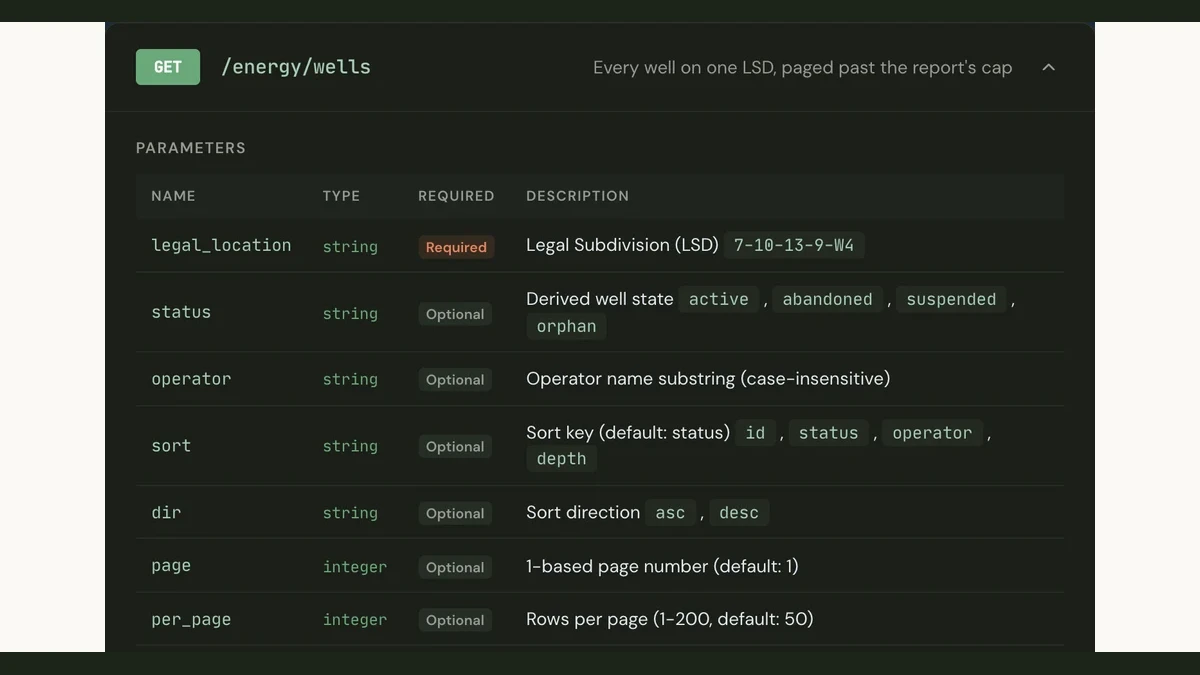
The full energy report includes wells, pipelines, facilities, and tenure rows for the queried LSD. For most parcels, the counts are small enough that everything fits in the response. But on busy LSDs in established producing areas, a single parcel can have dozens of wells, multiple pipeline crossings, and overlapping tenure dispositions. The report caps these arrays at 50 rows.
The v1 contract adds collection endpoints that return the full set, paginated and filterable:
| Collection endpoint | Filters | Sort options |
|---|---|---|
/energy/wells | status, operator | id, status, operator, depth |
/energy/pipelines | status, substance | id, substance, status, h2s, length |
/energy/facilities | status, category | id, category, status, operator |
/energy/tenure | tenure_kind, status, operator, expires_within_days | expiry, urgency, area, id |
Each collection endpoint takes per_page (1 to 200, default 50) and page parameters and returns a meta object with pagination state:
{
  "legal_location": "7-10-13-9-W4",
  "province": "AB",
  "rows": [...],
  "meta": {
    "total": 214,
    "page": 1,
    "per_page": 50,
    "sort": "status",
    "dir": "asc"
  }
}
The expires_within_days filter on /energy/tenure is particularly useful for land acquisition teams. A call like /energy/tenure?legal_location=7-10-13-9-W4&expires_within_days=180 returns only the Crown dispositions on that LSD that expire within the next six months. Perpetual dispositions are excluded from the window.
Cross-parcel endpoints: operator directory and expiring tenure
Two Energy API endpoints operate across parcels rather than on a single LSD.
/energy/operators is a browseable directory of AER licensees. It returns each operator's headline liability counts (orphan, abandoned, active wells) and Crown disposition totals. The q parameter searches by licensee name or BA code. Default ordering puts the highest-liability operators first.
/energy/tenure/expiring returns Crown tenure expiring within a configurable window, across every parcel. A land broker screening for acquisition targets can call /energy/tenure/expiring?expires_within_days=90&tenure_kind=png to find all Crown petroleum and natural gas dispositions expiring in the next quarter, without specifying a location.
Both endpoints support pagination (per_page, page) and sorting.
Standardized error schema
Every error response from the Ag API and Energy API now follows the same shape:
{
  "error": {
    "code": "invalid_legal_location",
    "message": "Could not parse 'XX-99-99-99-W9' as a legal land description"
  }
}
The code is a machine-readable string from a closed set: invalid_parameter, missing_parameter, invalid_legal_location, bc_not_supported, not_found, rate_limit_exceeded, report_failed, and internal_error. The message is a human-readable explanation.
Before v1, error responses varied by endpoint: some returned a plain string, others a different JSON structure. If your error handling parsed specific formats, you can now switch to checking error.code everywhere. A single switch on that field covers every error the API can return.
How to test your integration against the v1 contract
The full v1 contract is published as an OpenAPI 3.0 specification. You can use it with any OpenAPI-compatible tool to validate your requests and responses before deploying.
A practical migration checklist:
- Search your codebase for
/energy/activityand replace it with/energy/summary. This is the only breaking change. - Add
include=where you call/ag/reportor/energy/reportif you do not need every section. This reduces latency and payload size. - Switch to section routes for single-section lookups. If you only call
/ag/reportto get the productivity score,/ag/productivityis faster. - Switch to collection routes if you need more than 50 wells, pipelines, facilities, or tenure rows for a single LSD. The report still works for parcels with fewer rows.
- Update your error handling to read
error.codeanderror.message. The old ad-hoc error formats are gone. - Test with a real API key against the live endpoints. The developer portal and the API documentation page have updated code examples in curl, JavaScript, and Python.
If you are building in TypeScript, the townshipcanada npm package is updated to reflect the v1 routes. The Batch API guide and Search API guide cover the core location APIs that pair with the Ag and Energy endpoints.