Using the Search API to Convert Legal Land Descriptions
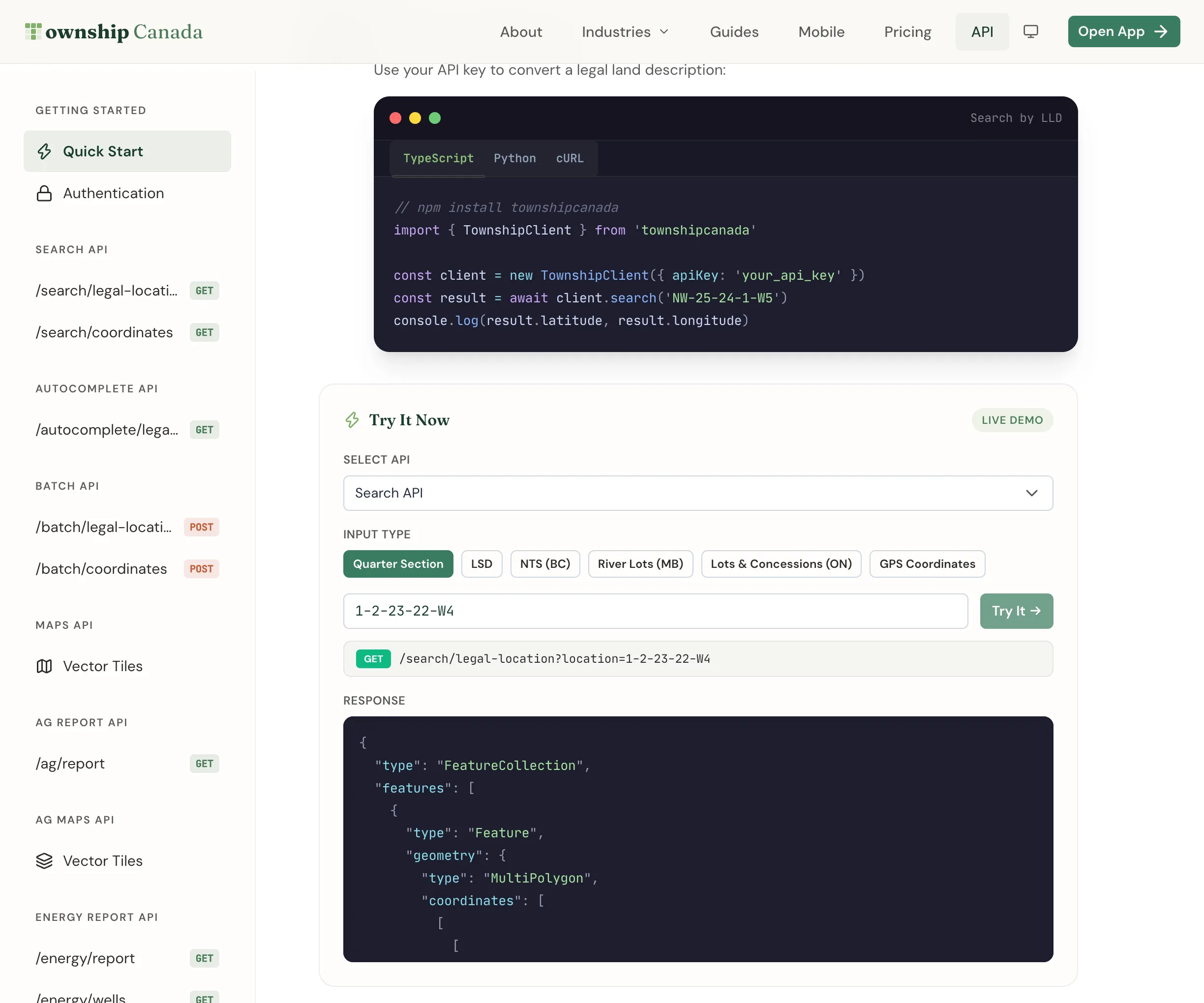
Convert Canadian legal land descriptions to GPS coordinates and reverse-geocode coordinates back to legal descriptions using the Township Canada Search API. Includes error handling and examples in vanilla JS, Node.js, Python, and React.
What You'll Build
A working integration that converts a legal land description like NW-25-24-1-W5 into GPS coordinates (latitude, longitude, and a boundary polygon), and a reverse lookup that converts GPS coordinates back into a legal land description. By the end you'll have examples in vanilla JS, Node.js, Python, and React.
Prerequisites
- A Township Canada API key - get one from the API page
- Basic familiarity with fetch and async/await
- For the Node.js example: Node.js 18+
- For the Python example: Python 3.8+ with the
requestslibrary - For the React example: a React project (Next.js, Vite, or Create React App)
See the API pricing page for Search API prices, and the API Integration Guide for pricing tiers and rate limits. If you prefer a typed client over raw HTTP, the townshipcanada TypeScript package wraps these endpoints with a single search() call.
The Search Endpoints
The Search API has two endpoints. Both live under https://developer.townshipcanada.com and require an X-API-Key header.
Forward: Legal Description to Coordinates
GET /search/legal-location
Headers:
X-API-Key: YOUR_API_KEY
Query parameters:
| Parameter | Required | Description |
|---|---|---|
location | Yes | Legal land description, e.g. NW-25-24-1-W5 |
Example request:
GET /search/legal-location?location=NW-25-24-1-W5
Response format:
{
  "type": "FeatureCollection",
  "features": [
    {
      "type": "Feature",
      "geometry": {
        "type": "Polygon",
        "coordinates": [
          [
            [-114.06, 51.05],
            [-114.06, 51.1],
            [-114.01, 51.1],
            [-114.01, 51.05],
            [-114.06, 51.05]
          ]
        ]
      },
      "properties": {
        "shape": "grid",
        "search_term": "NW-25-24-1-W5",
        "legal_location": "NW-25-24-1-W5",
        "unit": "Quarter Section",
        "survey_system": "DLS",
        "province": "Alberta"
      }
    },
    {
      "type": "Feature",
      "geometry": {
        "type": "Point",
        "coordinates": [-114.01924, 51.077932]
      },
      "properties": {
        "shape": "centroid",
        "search_term": "NW-25-24-1-W5",
        "legal_location": "NW-25-24-1-W5",
        "unit": "Quarter Section",
        "survey_system": "DLS",
        "province": "Alberta"
      }
    }
  ]
}
Each successful response returns a GeoJSON FeatureCollection containing two features:
- A grid feature with a
PolygonorMultiPolygongeometry representing the boundary of the legal subdivision. - A centroid feature with a
Pointgeometry at the center of the subdivision.
Use feature.properties.shape to distinguish between them. The centroid coordinates are at feature.geometry.coordinates as [longitude, latitude].
Reverse: Coordinates to Legal Description
GET /search/coordinates
Query parameters:
| Parameter | Required | Description |
|---|---|---|
location | Yes | Coordinates as lng,lat (e.g. -114.01924,51.077932) |
survey_system | No | Filter to a specific system: DLS, NTS, River Lot, Geographic Township |
unit | No | Resolution level: Township, Section, Quarter Section, LSD |
Example request:
GET /search/coordinates?location=-114.01924,51.077932&unit=Quarter%20Section
The response format is the same GeoJSON structure as the forward endpoint.
Step 1: Basic Forward Lookup
The simplest integration is a single fetch call. Pass the legal land description as the location query parameter and extract the centroid coordinates from the response.
async function searchLegalLocation(lld, apiKey) {
  const res = await fetch(
    `https://developer.townshipcanada.com/search/legal-location?location=${encodeURIComponent(lld)}`,
    { headers: { "X-API-Key": apiKey } }
  );

  if (!res.ok) {
    throw new Error(`HTTP ${res.status}: ${await res.text()}`);
  }

  const data = await res.json();
  const centroid = data.features.find((f) => f.properties.shape === "centroid");

  if (!centroid) return null;

  const [lng, lat] = centroid.geometry.coordinates;
  return { descriptor: centroid.properties.legal_location, lng, lat };
}
Step 2: Extracting the Boundary Polygon
For mapping applications, you'll want the boundary polygon in addition to the centroid. The grid feature gives you the full outline of the legal subdivision, which you can render as a filled or stroked polygon on a map.
async function searchWithBoundary(lld, apiKey) {
  const res = await fetch(
    `https://developer.townshipcanada.com/search/legal-location?location=${encodeURIComponent(lld)}`,
    { headers: { "X-API-Key": apiKey } }
  );

  if (!res.ok) {
    throw new Error(`HTTP ${res.status}: ${await res.text()}`);
  }

  const data = await res.json();
  const grid = data.features.find((f) => f.properties.shape === "grid");
  const centroid = data.features.find((f) => f.properties.shape === "centroid");

  return {
    descriptor: centroid?.properties.legal_location,
    centroid: centroid?.geometry.coordinates,
    boundary: grid?.geometry,
    properties: centroid?.properties
  };
}
You can pass boundary directly to Mapbox GL JS as a GeoJSON source, or to Leaflet's L.geoJSON() layer. See the Mapbox integration guide and Leaflet integration guide for complete map setup.
Step 3: Reverse Geocoding
Reverse geocoding converts a GPS coordinate into the legal land description at that point. This is useful for map-click interactions - a user clicks on a map, and you resolve the legal description for that location.
async function reverseGeocode(lng, lat, apiKey, options = {}) {
  const params = new URLSearchParams({ location: `${lng},${lat}` });

  if (options.surveySystem) params.set("survey_system", options.surveySystem);
  if (options.unit) params.set("unit", options.unit);

  const res = await fetch(`https://developer.townshipcanada.com/search/coordinates?${params}`, {
    headers: { "X-API-Key": apiKey }
  });

  if (!res.ok) {
    throw new Error(`HTTP ${res.status}: ${await res.text()}`);
  }

  const data = await res.json();
  const centroid = data.features.find((f) => f.properties.shape === "centroid");

  if (!centroid) return null;

  return {
    descriptor: centroid.properties.legal_location,
    surveySystem: centroid.properties.survey_system,
    province: centroid.properties.province,
    unit: centroid.properties.unit
  };
}
The unit parameter controls the resolution. Quarter Section returns the quarter section containing the point; LSD returns the more granular legal subdivision. Omitting the parameter returns the default resolution for the survey system.
Step 4: Error Handling
The API returns standard HTTP error codes. The most common ones you'll encounter:
| Code | Meaning | How to handle |
|---|---|---|
| 400 | Invalid input | Check the location parameter format |
| 401 | Missing or invalid key | Verify your API key |
| 404 | Location not found | The LLD doesn't exist in the database |
| 429 | Rate limit exceeded | Back off and retry after a delay |
| 500 | Server error | Retry with exponential backoff |
Wrap your fetch calls to handle these gracefully:
async function safeFetch(url, apiKey) {
  const res = await fetch(url, {
    headers: { "X-API-Key": apiKey }
  });

  if (res.status === 429) {
    const retryAfter = parseInt(res.headers.get("Retry-After") || "2", 10);
    await new Promise((resolve) => setTimeout(resolve, retryAfter * 1000));
    return safeFetch(url, apiKey);
  }

  if (!res.ok) {
    const body = await res.text();
    throw new Error(`API error ${res.status}: ${body}`);
  }

  return res.json();
}
Vanilla JS Example
A standalone page that performs a forward search and displays the result. No build step required.
<!DOCTYPE html>
<html lang="en">
  <head>
    <meta charset="UTF-8" />
    <title>Township Search</title>
    <style>
      body {
        font-family: system-ui, sans-serif;
        max-width: 480px;
        margin: 40px auto;
        padding: 0 20px;
      }
      input {
        width: 100%;
        padding: 10px 14px;
        font-size: 16px;
        box-sizing: border-box;
        margin-bottom: 8px;
      }
      button {
        padding: 10px 20px;
        font-size: 15px;
        cursor: pointer;
      }
      .result {
        margin-top: 16px;
        padding: 16px;
        background: #f5f5f5;
        border-radius: 8px;
        font-family: monospace;
        font-size: 14px;
        white-space: pre-wrap;
      }
      .error {
        color: #c45d3a;
      }
    </style>
  </head>
  <body>
    <h2>Legal Land Description Lookup</h2>
    <input
      id="lld-input"
      type="text"
      placeholder="e.g. NW-25-24-1-W5"
    />
    <button id="search-btn">Search</button>
    <div
      id="result"
      class="result"
      hidden
    ></div>

    <script>
      const API_KEY = "YOUR_API_KEY";
      const input = document.getElementById("lld-input");
      const btn = document.getElementById("search-btn");
      const resultDiv = document.getElementById("result");

      async function search() {
        const lld = input.value.trim();
        if (!lld) return;

        resultDiv.hidden = false;
        resultDiv.className = "result";
        resultDiv.textContent = "Searching...";

        try {
          const res = await fetch(
            `https://developer.townshipcanada.com/search/legal-location?location=${encodeURIComponent(lld)}`,
            { headers: { "X-API-Key": API_KEY } }
          );

          if (!res.ok) throw new Error(`HTTP ${res.status}`);

          const data = await res.json();
          const centroid = data.features.find((f) => f.properties.shape === "centroid");

          if (!centroid) {
            resultDiv.textContent = "No results found for that description.";
            return;
          }

          const [lng, lat] = centroid.geometry.coordinates;
          const props = centroid.properties;

          resultDiv.textContent =
            `Descriptor: ${props.legal_location}\n` +
            `Latitude:   ${lat}\n` +
            `Longitude:  ${lng}\n` +
            `Province:   ${props.province}\n` +
            `System:     ${props.survey_system}`;
        } catch (err) {
          resultDiv.className = "result error";
          resultDiv.textContent = `Error: ${err.message}`;
        }
      }

      btn.addEventListener("click", search);
      input.addEventListener("keydown", (e) => {
        if (e.key === "Enter") search();
      });
    </script>
  </body>
</html>
Node.js Example
A command-line script that converts a legal land description and prints the result.
const API_KEY = process.env.TOWNSHIP_CANADA_API_KEY;
const BASE_URL = "https://developer.townshipcanada.com";

async function searchLegal(lld) {
  const res = await fetch(`${BASE_URL}/search/legal-location?location=${encodeURIComponent(lld)}`, {
    headers: { "X-API-Key": API_KEY }
  });

  if (!res.ok) {
    throw new Error(`HTTP ${res.status}: ${await res.text()}`);
  }

  const data = await res.json();
  return data.features;
}

async function searchCoordinates(lng, lat, unit = "Quarter Section") {
  const params = new URLSearchParams({
    location: `${lng},${lat}`,
    unit
  });

  const res = await fetch(`${BASE_URL}/search/coordinates?${params}`, {
    headers: { "X-API-Key": API_KEY }
  });

  if (!res.ok) {
    throw new Error(`HTTP ${res.status}: ${await res.text()}`);
  }

  const data = await res.json();
  return data.features;
}

async function main() {
  const lld = process.argv[2] || "NW-25-24-1-W5";

  // Forward: LLD → coordinates
  console.log(`Searching: ${lld}`);
  const features = await searchLegal(lld);
  const centroid = features.find((f) => f.properties.shape === "centroid");

  if (centroid) {
    const [lng, lat] = centroid.geometry.coordinates;
    console.log(`  Descriptor: ${centroid.properties.legal_location}`);
    console.log(`  Latitude:   ${lat}`);
    console.log(`  Longitude:  ${lng}`);
    console.log(`  Province:   ${centroid.properties.province}`);

    // Reverse: coordinates → LLD
    console.log(`\nReverse geocoding: ${lng}, ${lat}`);
    const reverseFeatures = await searchCoordinates(lng, lat);
    const reverseCentroid = reverseFeatures.find((f) => f.properties.shape === "centroid");

    if (reverseCentroid) {
      console.log(`  Resolved:   ${reverseCentroid.properties.legal_location}`);
    }
  } else {
    console.log("  No results found.");
  }
}

main().catch(console.error);
Run it with:
TOWNSHIP_CANADA_API_KEY=your_key_here node search.js "NW-25-24-1-W5"
Python Example
The same forward and reverse workflow using the requests library.
import os
import sys

import requests

API_KEY = os.environ["TOWNSHIP_CANADA_API_KEY"]
BASE_URL = "https://developer.townshipcanada.com"
HEADERS = {"X-API-Key": API_KEY}


def search_legal(lld):
    response = requests.get(
        f"{BASE_URL}/search/legal-location",
        params={"location": lld},
        headers=HEADERS,
        timeout=10,
    )
    response.raise_for_status()
    return response.json()["features"]


def search_coordinates(lng, lat, unit="Quarter Section"):
    response = requests.get(
        f"{BASE_URL}/search/coordinates",
        params={"location": f"{lng},{lat}", "unit": unit},
        headers=HEADERS,
        timeout=10,
    )
    response.raise_for_status()
    return response.json()["features"]


def main():
    lld = sys.argv[1] if len(sys.argv) > 1 else "NW-25-24-1-W5"

    # Forward: LLD → coordinates
    print(f"Searching: {lld}")
    features = search_legal(lld)
    centroid = next((f for f in features if f["properties"]["shape"] == "centroid"), None)

    if centroid:
        lng, lat = centroid["geometry"]["coordinates"]
        props = centroid["properties"]
        print(f"  Descriptor: {props['legal_location']}")
        print(f"  Latitude:   {lat}")
        print(f"  Longitude:  {lng}")
        print(f"  Province:   {props['province']}")

        # Reverse: coordinates → LLD
        print(f"\nReverse geocoding: {lng}, {lat}")
        reverse_features = search_coordinates(lng, lat)
        reverse_centroid = next(
            (f for f in reverse_features if f["properties"]["shape"] == "centroid"), None
        )
        if reverse_centroid:
            print(f"  Resolved:   {reverse_centroid['properties']['legal_location']}")
    else:
        print("  No results found.")


if __name__ == "__main__":
    main()
Run it with:
pip install requests
TOWNSHIP_CANADA_API_KEY=your_key_here python search.py "NW-25-24-1-W5"
React Example
A hook and component for forward search with loading and error states.
hooks/useSearchApi.js
import { useState, useCallback } from "react";

export function useSearchApi(apiKey) {
  const [result, setResult] = useState(null);
  const [isLoading, setIsLoading] = useState(false);
  const [error, setError] = useState(null);

  const search = useCallback(
    async (lld) => {
      if (!lld.trim()) return;

      setIsLoading(true);
      setError(null);
      setResult(null);

      try {
        const res = await fetch(
          `https://developer.townshipcanada.com/search/legal-location?location=${encodeURIComponent(lld)}`,
          { headers: { "X-API-Key": apiKey } }
        );

        if (!res.ok) {
          throw new Error(res.status === 404 ? "Location not found" : `HTTP ${res.status}`);
        }

        const data = await res.json();
        const centroid = data.features.find((f) => f.properties.shape === "centroid");
        const grid = data.features.find((f) => f.properties.shape === "grid");

        if (!centroid) {
          setError("No results found");
          return;
        }

        const [lng, lat] = centroid.geometry.coordinates;
        setResult({
          descriptor: centroid.properties.legal_location,
          lat,
          lng,
          province: centroid.properties.province,
          surveySystem: centroid.properties.survey_system,
          boundary: grid?.geometry || null
        });
      } catch (err) {
        setError(err.message);
      } finally {
        setIsLoading(false);
      }
    },
    [apiKey]
  );

  const clear = useCallback(() => {
    setResult(null);
    setError(null);
  }, []);

  return { result, isLoading, error, search, clear };
}
components/LldSearch.jsx
import { useState } from "react";
import { useSearchApi } from "../hooks/useSearchApi";

export function LldSearch({ apiKey, onResult }) {
  const [query, setQuery] = useState("");
  const { result, isLoading, error, search, clear } = useSearchApi(apiKey);

  function handleSubmit(e) {
    e.preventDefault();
    search(query);
  }

  // Notify parent when result changes
  if (result && onResult) {
    onResult(result);
  }

  return (
    <div className="search-wrapper">
      <form onSubmit={handleSubmit}>
        <input
          type="text"
          value={query}
          onChange={(e) => setQuery(e.target.value)}
          placeholder="e.g. NW-25-24-1-W5"
        />
        <button
          type="submit"
          disabled={isLoading}
        >
          {isLoading ? "Searching..." : "Search"}
        </button>
      </form>

      {error && <p className="error">{error}</p>}

      {result && (
        <div className="result">
          <h3>{result.descriptor}</h3>
          <p>Latitude: {result.lat}</p>
          <p>Longitude: {result.lng}</p>
          <p>Province: {result.province}</p>
          <p>System: {result.surveySystem}</p>
        </div>
      )}
    </div>
  );
}
Usage in a parent component:
<LldSearch
  apiKey="YOUR_API_KEY"
  onResult={({ lng, lat, boundary }) => {
    map.flyTo({ center: [lng, lat], zoom: 12 });
    if (boundary) addBoundaryLayer(boundary);
  }}
/>
Supported Land Description Formats
The Search API accepts all major Canadian survey systems. The format follows each system's standard notation:
DLS (Dominion Land Survey) - Alberta, Saskatchewan, Manitoba, BC Peace River
| Level | Format | Example |
|---|---|---|
| Section | Section-Twp-Rge-Mer | 25-24-1-W5 |
| Quarter Section | Quarter-Section-Twp-Rge-Mer | SW-25-24-1-W5 |
| LSD | LSD-Section-Twp-Rge-Mer | 7-25-24-1-W5 |
NTS (National Topographic System) - British Columbia
| Format | Example |
|---|---|
| QuarterUnit-Unit-Block/MapSeries-MapArea-MapSheet | A-2-F/93-P-8 |
Geographic Townships - Ontario
| Format | Example |
|---|---|
| Lot-Concession-Township | Lot 2 Con 4 Osprey |
River/Parish Lots - Manitoba (along rivers)
FPS (Federal Permit System) - Northwest Territories, Nunavut, offshore areas
The API normalizes whitespace, dashes, and common abbreviations. You don't need to pre-format user input.
Next Steps
- Display results on a map: pass the boundary polygon and centroid to your map - see the Mapbox integration guide or Leaflet integration guide.
- Add type-ahead search: use the Autocomplete API guide for search-as-you-type.
- Bulk conversion: for more than a handful of lookups, the Batch API guide handles datasets of any size.
- API key management: covered in the API key management guide.
Related guides: API Integration · Autocomplete API Guide · Batch API Guide · Mapbox Integration
Related Guides
Legal Land Description API Integration Guide
Integrate legal land description APIs into your applications. Convert LLDs to coordinates, add autocomplete search, process batch records, and display DLS/NTS grid maps. REST API with JSON responses.
Managing API Keys for Development, Staging, and Production
Create and manage multiple Township Canada API keys for different environments. Naming conventions, key rotation, environment variables, and CI/CD setup.
API Troubleshooting & Best Practices
Fix common Township Canada API errors including Forbidden responses, CORS issues, rate limiting, and empty results. Includes debugging tips and integration patterns.