Input Format Reference - How to Type Legal Land Descriptions
Quick reference for entering legal land descriptions into Township Canada. Common mistakes, format examples, and how to clean data from tax bills, spreadsheets, and government databases.
Not sure how to type your legal land description? This guide shows the expected format for every survey system Township Canada supports, along with the most common mistakes and how to fix them.
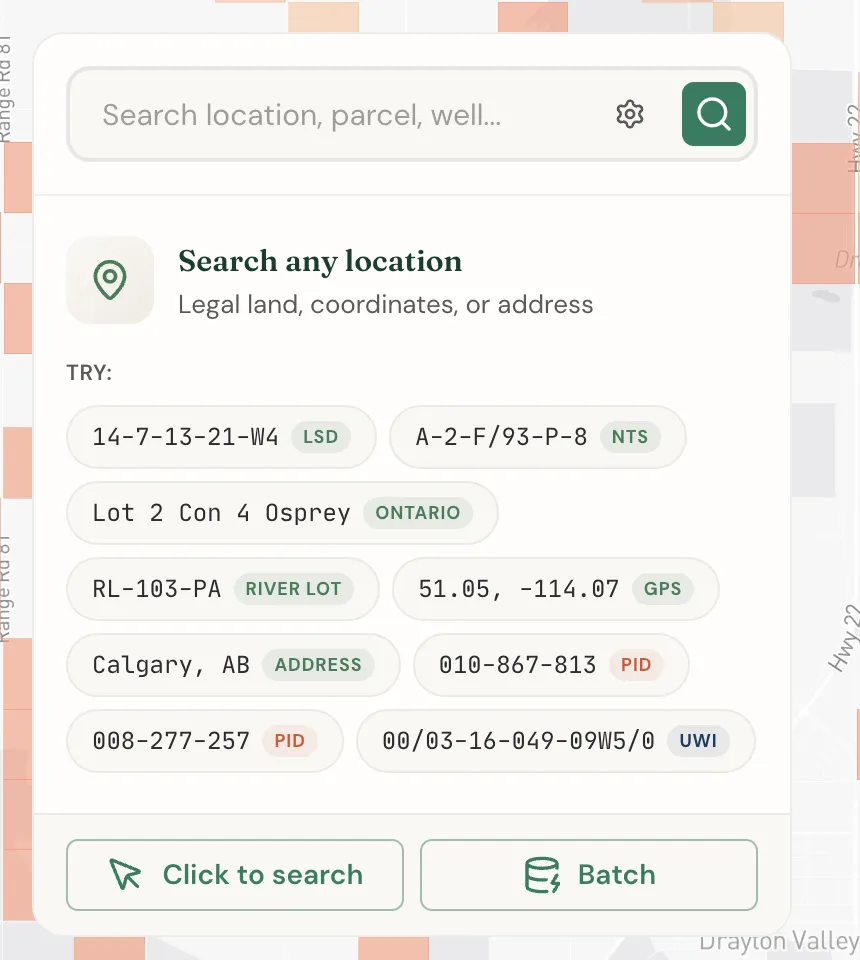
Quick reference: expected formats
Each survey system has a specific input format. Here is what Township Canada expects:
| Survey System | Format | Example |
|---|---|---|
| DLS - LSD | LSD-Section-Township-Range-Meridian | 7-25-24-1-W5 |
| DLS - Quarter Section | Quarter-Section-Township-Range-Meridian | NE-25-24-1-W5 |
| DLS - Section | Section-Township-Range-Meridian | 25-24-1-W5 |
| NTS (BC) | Unit-Block/MapSeries-MapArea-MapSheet | 2-F/93-P-8 |
| Ontario | Lot # Con # TownshipName | Lot 29 Con 10 Nipissing |
| River Lot (MB) | Type-Number-Parish | RL-103-PA |
| FPS (NWT/Nunavut) | Unit Section Grid | F 48 60-20 N 100-30 W |
Separate components with dashes or spaces. Both SW 25 24 1 W5 and SW-25-24-1-W5 work.
Common mistakes and fixes
These are the input errors that come up most often, based on real customer support conversations.
Missing "W" on the meridian
The meridian must include the "W" prefix. A bare number is ambiguous.
| What you typed | What to type instead |
|---|---|
25-24-1-4 | 25-24-1-W4 |
SW-7-04-26-2 | SW-7-4-26-W2 |
33-38-18-2 | 33-38-18-W2 |
If you know the province, you can infer the meridian: Alberta is W4, W5, or W6, Saskatchewan is W2 or W3, Manitoba is W1.
Extra text from databases
Government databases and spreadsheets often include extra information after the legal description. Strip everything that is not part of the location.
| What you pasted | What to type |
|---|---|
LSD 12-03-10-23 W4M (MONARCH COMP STN) | 12-3-10-23-W4 |
NW-26-89-10-W4 Athabasca | NW-26-89-10-W4 |
SE-15-48-2-W5, Cochrane, AB | SE-15-48-2-W5 |
Special characters
Characters like apostrophes, smart quotes, and non-breaking spaces break conversions - especially in batch mode. These are invisible and usually come from Excel, Word, or PDF copy-paste.
| Problem | Fix |
|---|---|
NW-'6-55-26-W4 (apostrophe) | Remove the apostrophe: NW-6-55-26-W4 |
| Smart quotes from Word | Paste into a plain text editor first, then copy from there |
| Non-breaking spaces from PDF | Same fix - paste into plain text editor first |
"LT" instead of "Lot" in Ontario
Ontario tax bills often abbreviate "Lot" as "LT". Township Canada needs the full word.
| What you typed | What to type |
|---|---|
LT 29 CON 10 NIPISSING | Lot 29 Con 10 Nipissing |
Sub-lot fractions (E 1/2, N 1/4)
Older legal documents sometimes include sub-lot fractions like "E 1/2 OF N 1/2". Township Canada does not support these - the smallest unit is a quarter section (NE, NW, SE, SW) for DLS or a full lot for Ontario.
| What your document says | What to type |
|---|---|
E 1/2 OF N 1/2 LT 13 CON 8 TYENDINAGA | Lot 13 Con 8 Tyendinaga |
Part SE section 6 township 17 Range 2 Meridian E1 | SE-6-17-2-E1 |
Multiple locations in one line
If your source has several quarter sections compressed into one line, split them into separate searches or use batch conversion.
SE15, NE10, NW11-33-5 W5 is actually three locations:
SE-15-33-5-W5NE-10-33-5-W5NW-11-33-5-W5
Leading zeros
04-26-W2 and 4-26-W2 are equivalent. Township Canada handles both. If you get unexpected results with leading zeros, the issue is likely something else - double-check the full description.
Cleaning data from common sources
ABSA / AER spreadsheets (Alberta)
These exports often include station names, operator codes, or well status columns alongside the legal description. Copy only the LSD/section column. Strip any text in parentheses.
Saskatchewan HabiSask exports
HabiSask uses leading zeros and sometimes includes location qualifiers. Remove qualifiers and let Township Canada handle the zeros.
Ontario property tax bills
Tax bills include parcel numbers (PCL), mining claim references, instrument numbers, and other registry metadata. The only parts Township Canada needs are:
- Lot number
- Concession number
- Township name
Example: from "PCL 6123 SEC NS; BROKEN LT 29 CON 10 NIPISSING BEING MINING CLAIMS PS1696 & PS1697", extract Lot 29 Con 10 Nipissing. "BROKEN LT" just means an irregular lot - use the lot number normally.
Oil & gas well databases
Well databases use UWI (Unique Well Identifier) format, which looks similar to DLS but includes extra components. Strip the well event sequence and location exception codes to get the base legal description.
Batch conversion format tips
When pasting data into batch conversion:
- One location per line - do not put multiple descriptions on one line
- No headers - do not include column names like "Legal Description" in the paste
- Clean your data first - use Excel's
TRIM()andSUBSTITUTE()functions to remove extra spaces and special characters before copying - Don't mix with blank lines - blank lines can cause parsing errors
- Mixed formats are OK - you can include DLS, NTS, and Ontario descriptions in the same batch
Still stuck?
If your description does not match any format above, try the AI Assistant - it can help normalize messy inputs. Or contact support with the exact text you are trying to convert.
Related Guides
Supported Coverage & Regional Limitations
Which provinces and territories does Township Canada cover? Understand coverage by survey system, resolution limits, and known gaps in Winnipeg and unsupported provinces.
Get Directions to Legal Land Descriptions | LSD Navigation
Get driving directions to legal land descriptions, LSDs, and quarter sections. Navigate to remote well sites, field locations, and rural properties using DLS or NTS coordinates with turn-by-turn instructions.
Dominion Land Survey (DLS) System Explained
Complete guide to the Dominion Land Survey system used in Alberta, Saskatchewan, Manitoba, and BC. Learn about townships, ranges, sections, and meridians.