By Township Canada
Mobile App Included with Every Plan: Account-Based Sign-In, No License Keys
The Township Canada mobile app is now included with every paid plan. Sign in with your account, no license keys to manage. Android live, iOS in development.
A land technician on a Pro plan has been checking DLS quarter sections on the web app all week. Friday morning, the field crew calls: they need GPS coordinates for LSD 06-32-048-07W5, a surface lease site near Drayton Valley, and they need them before lunch. The land tech pulls out their phone, opens the Township Canada app, and realizes the mobile subscription lapsed two months ago. The license key expired. Renewing means logging into the account portal, generating a new key, copying it to the phone, and activating the device. By the time the key is sorted out, the crew is already driving to the wrong quarter section.
That workflow is gone. The Township Canada mobile app is now included with every paid plan: Starter, Pro, and Business. No license keys. No separate mobile subscription. Sign in with the same account you use on the web, and you're in the field in seconds.
What the license key model got wrong
The old mobile model treated the app as a separate product. You had a web subscription, and if you wanted mobile access, you either bought the standalone Mobile SKU at $10/month or upgraded to the Pro + Mobile bundle at $25/month. Both are now retired.
That model created three problems:
Key management was a chore. License keys were device-bound. Change phones, and you needed a new key. Share access with a field crew member, and you were copying keys through text messages or sticky notes. If the key expired and you were 200 km from the office, you were out of luck until someone at a desk could generate a fresh one.
Cost split the user base. A Pro subscriber paying $20/month for unlimited searches, PDF exports, and route planning still had no mobile access unless they paid extra. The result was predictable: most Pro users never installed the app, even though field access was exactly what they needed.
Two sessions, two systems. The web app and the mobile app ran on different authentication paths. The web used passwordless sign-in (email OTP, magic link, Google or Microsoft OAuth). The mobile app used a license key that had nothing to do with your account credentials. Two systems meant two points of failure, two things to troubleshoot when access broke.
How the new model works
Every paid plan (Starter at $10/month, Pro at $20/month, Business at $40/month) now includes the mobile app at no extra cost. The pricing did not change. The mobile app is simply part of the plan.
Sign-in uses the same account and the same authentication methods as the web app:
- Email OTP. Enter your email, receive a 6-digit code, type it in. Same flow as signing into the web app at app.townshipcanada.com.
- Google or Microsoft OAuth. Tap "Sign in with Google" or "Sign in with Microsoft" and authorize once. The app exchanges a one-time code with the server and stores a session token locally.
One active mobile session per account. Signing in on a new phone automatically signs out the old device. No key rotation, no device limits to track, no portal to visit. If your crew shares an account (Business plan with team seats is the better fit for that, but single-account sharing still works), the last device to sign in is the active one.
The session uses a token pair: an access token that refreshes every hour, and a refresh token on a 60-day sliding window. In practice, that means you stay signed in for months of normal use without re-entering credentials. If you don't open the app for 60 days, you sign in again the same way you always do.
From web lookup to field navigation on the same account
Here is the workflow the new model makes possible, end to end.
A land technician working out of Red Deer is reviewing surface access for a well licence application. The quarter section is NE-14-39-4-W5, about 20 km west of Innisfail. On Tuesday, they look it up on the web app, toggle the AER Wells layer to confirm no existing wellbores conflict with the proposed location, and save the parcel to a project for the field visit later that week.
Thursday morning, they drive out. Parked on a grid road at the edge of the section, they open the Township Canada app on their phone, sign in (already signed in, actually, from a previous session), and search NE-14-39-4-W5. The app centres the map on the quarter section with the DLS grid overlay visible. GPS puts their truck pin on the southeast corner. They confirm they are at the right quarter, walk the proposed access route, and take photos geotagged to the actual parcel.
No license key. No second subscription. No moment of "wait, did the mobile expire?" The web account is the mobile account.
For Business plan users with team seats, every team member gets mobile access with their own account. A field supervisor in Grande Prairie and an office administrator in Calgary both sign in with their own email. Each has their own session, their own saved projects, and their own usage tracked against the team's shared subscription.
What changed for existing subscribers
Starter and Pro subscribers who previously had no mobile access now have it. Download the app, sign in with your account, and the server confirms your plan includes mobile. No action needed on the billing side.
Former Mobile or Pro + Mobile bundle subscribers are migrated to their equivalent web plan. If you were on the standalone Mobile SKU, your billing has been adjusted. If you were on the Pro + Mobile bundle at $25/month, you are now on Pro at $20/month with mobile included. The net effect is the same access at a lower price.
Business subscribers already had mobile access under the old bundle model, but it was inconsistent: some Business accounts had it, some didn't, depending on when they subscribed. That inconsistency is gone. Every active Business plan includes mobile.
The old license key endpoints (/activate, /validate, /deactivate) now return 410 Gone with a message pointing to the new sign-in flow. If you have automation that called those endpoints, it will stop working. The replacement is straightforward: the app handles authentication internally, and the mobile API documentation covers the new endpoints if you need them for a custom integration.
What the mobile app does
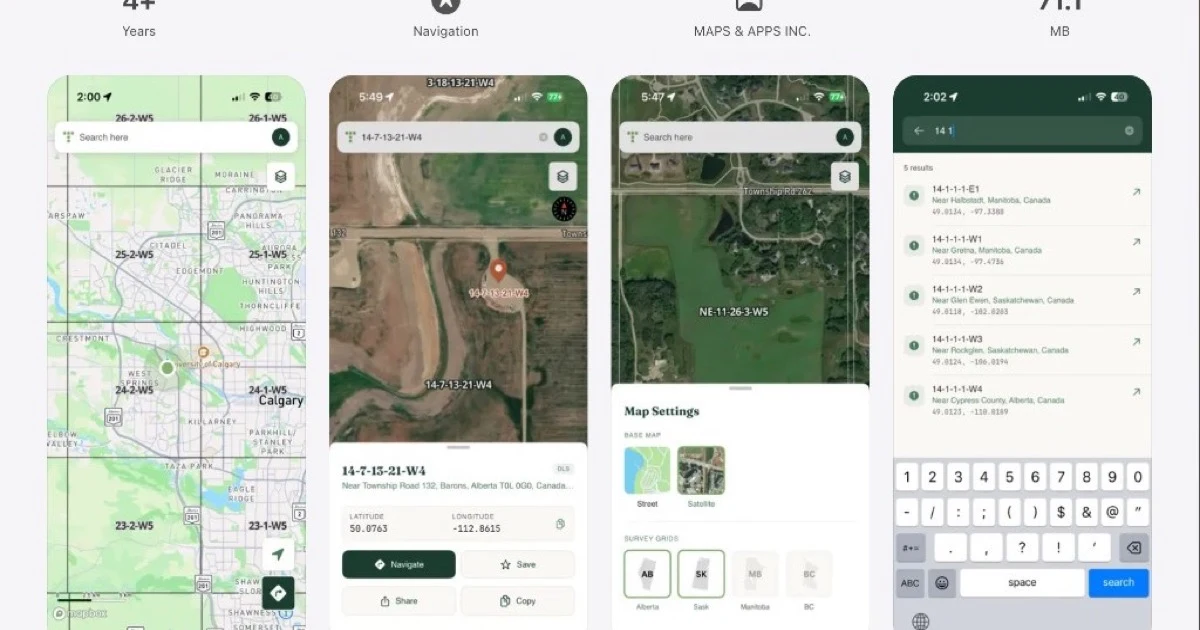
The mobile app is a field companion to the web app, not a separate product. It covers the workflows that matter when you're standing on a quarter section instead of sitting at a desk:
- Search by legal land description. Type a DLS quarter section like
SW-22-49-23-W3or an LSD like06-32-048-07W5and the app centres the map on that parcel with the survey grid visible. - GPS position on the DLS grid. See where you are relative to section lines, quarter section boundaries, and legal subdivisions. Useful for confirming you're at the right location before starting field work.
- UWI search. Enter a Unique Well Identifier and the app resolves it to the underlying legal land description and map location.
- Map layers. Energy and Agriculture Bundle layers (wells, pipelines, facilities, soils) are available on mobile with the same add-on entitlements as the web app. If your web account has the Energy Bundle, the mobile app shows the same layers.
- Autocomplete. The mobile search supports the same autocomplete as the web app: UWI, DLS, NTS, coordinates, and place names, all resolved in priority order.
Usage counts against the same monthly quota as the web app. A Starter plan gets 100 searches per month across both web and mobile. Pro and Business searches are unlimited.
How to get started
- Download the app. Android is live on Google Play. iOS is in development.
- Sign in. Open the app and sign in with your Township Canada account: email OTP, Google, or Microsoft. Same credentials as the web app.
- Search. Type a legal land description and the map centres on the parcel. Toggle layers from the layers panel.
If you don't have a Township Canada account yet, plans start at $10/month with a 30-day money-back guarantee. See the pricing page for a full comparison of Starter, Pro, and Business, or go to the mobile page for more on what the app does in the field.
For existing subscribers: the mobile app is already included in your plan. No upgrade, no add-on, no action required. Just download and sign in.