By Township Canada
Batch Conversion and CSV Upload - Convert Thousands of Locations at Once
Upload a CSV with thousands of legal land descriptions and get GPS coordinates back for every row. Catch errors and export to Enhanced CSV, KML, Shapefile, DXF, GeoJSON, or PDF.
A pipeline company needs GPS coordinates for 2,000 well locations listed in a regulatory filing. A crop insurance adjuster has 500 quarter sections to verify before planting season. A land broker is building a property portfolio with 300 rural parcels across three provinces. Converting these one at a time - typing each legal land description into a search box, copying the coordinates, pasting them into a spreadsheet - takes hours. For 2,000 records, it takes days.
Township Canada's batch conversion tool does the same job in minutes.
Upload a CSV, Get Coordinates Back
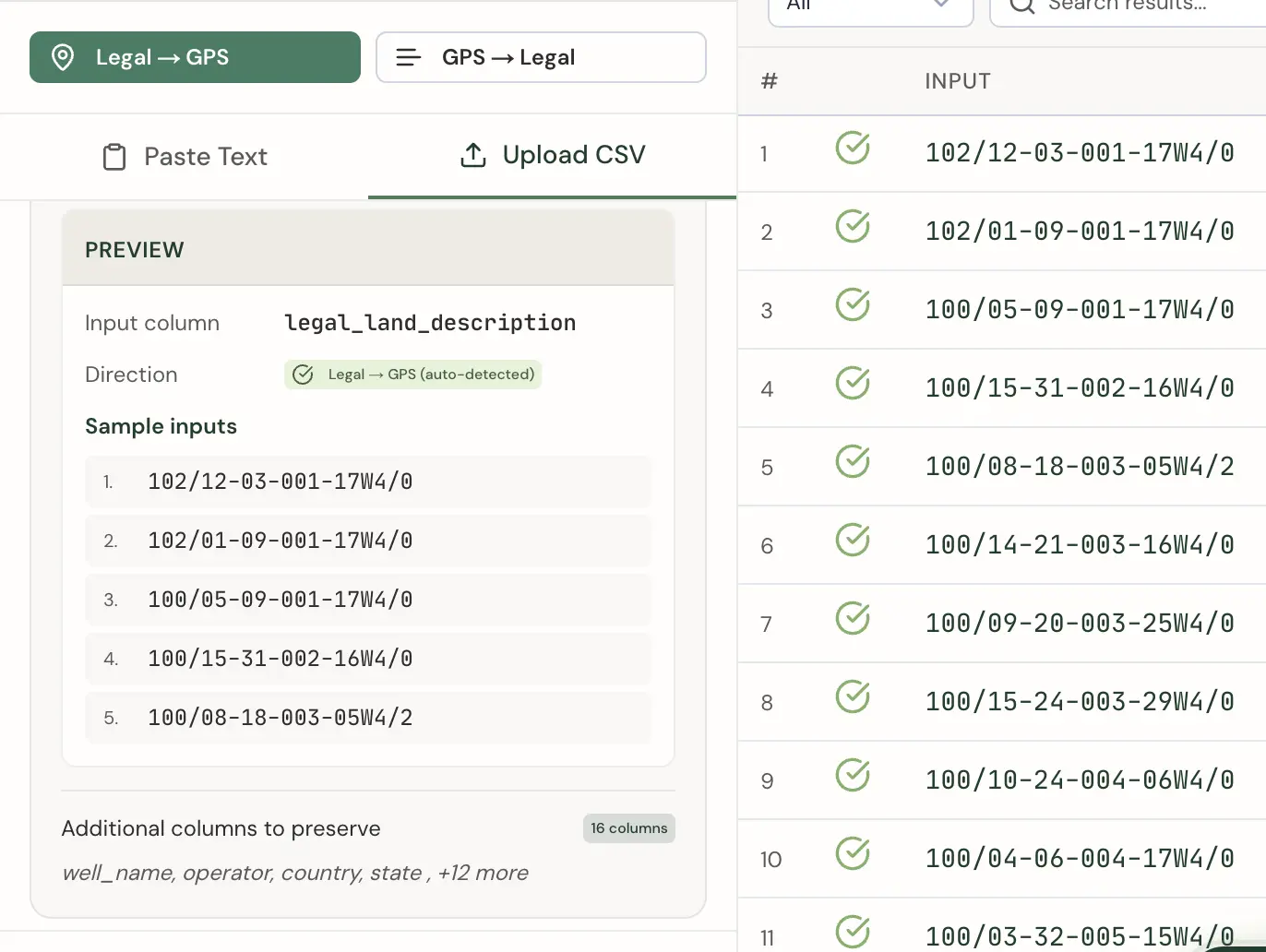
The process starts with a CSV file. If your data lives in Excel, Google Sheets, or any database that exports to CSV, that file is your input. Upload it to Township Canada's batch converter, and the tool reads your column headers and previews the first few rows so you can confirm the data looks right.
Automatic Column Detection
The batch tool automatically detects your input columns by matching common header names. For legal land descriptions, it recognizes headers like legal_land_description, lld, legal, location, or description. For reverse conversion (GPS to legal), it looks for latitude/lat and longitude/lng/lon columns. The tool auto-detects which direction to convert based on what it finds.
Your legal land descriptions should be in a single column using the standard combined format - for example, 14-27-048-05W5 or NW-36-42-3-W5. Any extra columns in your CSV (well name, operator, notes) are preserved and included in the Enhanced CSV export.
Error Handling
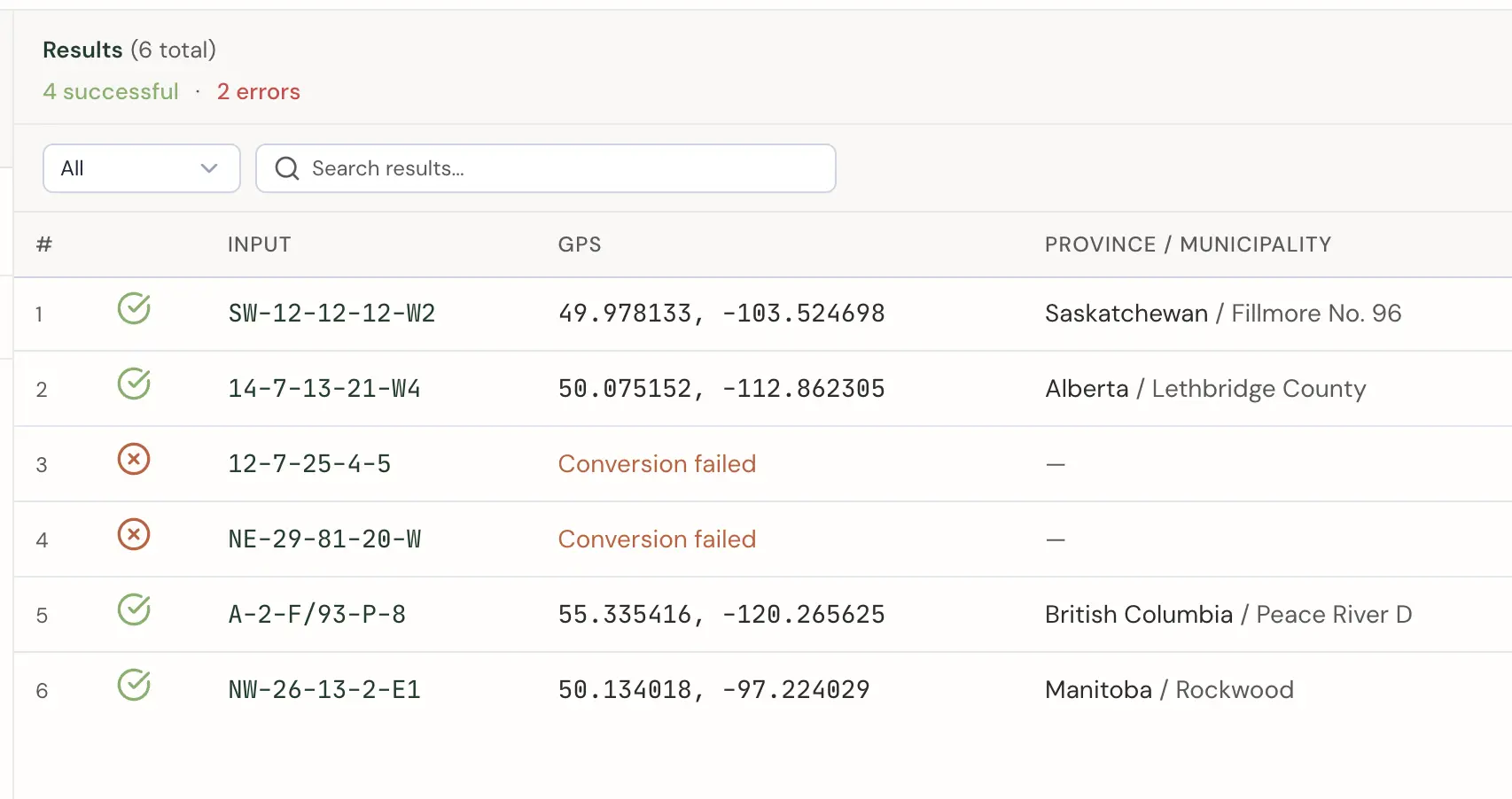
Not every row converts successfully. A typo in a legal land description, an invalid range number, or a section that doesn't exist in a particular township - these are common in large datasets. The batch tool doesn't stop at the first error. It processes every row, marks the ones that failed, and tells you why each one failed.
After the batch completes, you see a summary: 1,847 of 2,000 converted successfully, 153 failed. You can filter the results table to show only errors, review the specific reason each row failed, and fix the issues in your spreadsheet before re-uploading.
Processing Speed
Batch conversion runs server-side - your browser uploads the file, and Township Canada processes each row against its coordinate database. A file with 1,000 DLS locations typically completes in under 30 seconds. Larger files (up to the 5,000-row limit) take a few minutes depending on the mix of survey systems.
Export to Every Format You Need
Once conversion is complete, results are available in multiple export formats:
- Enhanced CSV - Your original CSV with all existing columns preserved, plus latitude, longitude, province, municipality, and status columns appended. Open it in Excel or import it into any database.
- CSV - A clean spreadsheet with inputs, coordinates, and conversion status.
- KML - For Google Earth. Each converted location appears as a placemark you can browse on the globe.
- Shapefile - For ArcGIS, QGIS, and other GIS platforms. The standard format for spatial data in the geomatics industry.
- DXF - For AutoCAD. Import converted locations directly into CAD drawings for site plans and engineering work.
- GeoJSON - For web mapping applications. Drop the file into Mapbox, Leaflet, or any JavaScript mapping library.
- PDF - A formatted report with all converted locations, coordinates, and a map overview.
Who Uses Batch Conversion
Batch conversion is built for anyone processing more than a handful of locations at a time:
- Oil and gas companies processing well licence locations, pipeline crossings, and facility coordinates from AER or other regulatory filings
- Crop insurance adjusters verifying quarter section locations across hundreds of policy applications before a coverage deadline
- Land brokers and real estate firms building databases of rural properties with GPS coordinates for mapping and analysis
- Municipal planners converting parcel inventories from legal land descriptions to spatial data for GIS projects
- Environmental consultants mapping assessment sites from legal descriptions provided in regulatory permits
For development teams integrating conversions directly into production systems, the Township Canada API provides programmatic access with real-time lookups, autocomplete, and batch endpoints.
Getting Started
Batch conversion is available on the Business plan. Upload your first CSV on the batch conversion page and run the conversion. For details on plan limits and export options, see pricing.