By Township Canada
Orphan Well Cleanup: How DLS Tools Speed Up Site Location
Alberta's Orphan Well Association manages thousands of well sites for cleanup. Every one is identified by an LSD. Here's how DLS conversion tools fit into the orphan well workflow.
Alberta's orphan well inventory keeps growing. The Orphan Well Association (OWA) manages the cleanup of wells where the original licensee no longer exists or can't pay for closure. The total liability runs into the hundreds of millions. Thousands of sites are in active assessment, abandonment, or reclamation - and every one of them is identified by an LSD in the AER's well database.
For the contractors, environmental consultants, and project managers working on orphan well cleanup, the workflow starts the same way every time: a list of LSDs that need to become GPS coordinates.
The Scale of Orphan Well Cleanup
The OWA's mandate covers wells across Alberta - from the deep gas wells in the foothills to shallow oil wells in the east-central plains. The geographic spread is enormous: orphan sites can be found in any township in the province.
A typical OWA contractor might receive a work package of 20 to 50 wells in a region. The package arrives as a spreadsheet of well licences, each identified by a UWI that encodes the DLS address. Before any field work begins, the contractor needs to:
- Convert every LSD to GPS coordinates for crew dispatch
- Map the full set to identify geographic clusters and plan mobilization
- Verify each LSD resolves to a valid parcel in the expected area
- Plan efficient driving routes across multiple sites
That's the same workflow whether the package contains 10 wells or 100. The only variable is how long it takes.
Why LSD Errors Are Expensive in Orphan Well Work
Orphan well sites are, by definition, poorly maintained. Surface markers may be missing. Access roads may be overgrown. The well licence file might be decades old, with location data entered in legacy formats.
A wrong meridian is the most common and most expensive error. LSD 10-33-037-04W5 is a parcel near Sundre, in a region with significant OWA activity. The same LSD at W4 is near Hanna, 200 kilometres to the east. A field crew dispatched to the wrong meridian loses an entire day - plus the rig mobilization, fuel, and accommodation costs.
For an environmental consultant conducting Phase I assessments at orphan sites, a transposed township number means the desktop review is based on satellite imagery and land use records for the wrong location. The error may not surface until the field visit, at which point the assessment needs to be redone from scratch.
Validating every LSD in the work package before dispatching crews is a basic quality step that prevents these errors. Batch conversion with automatic validation catches the problems - wrong meridians, out-of-range townships, missing data - before anyone drives to a site.
How DLS Tools Fit the OWA Workflow
Step 1: Verify the Work Package
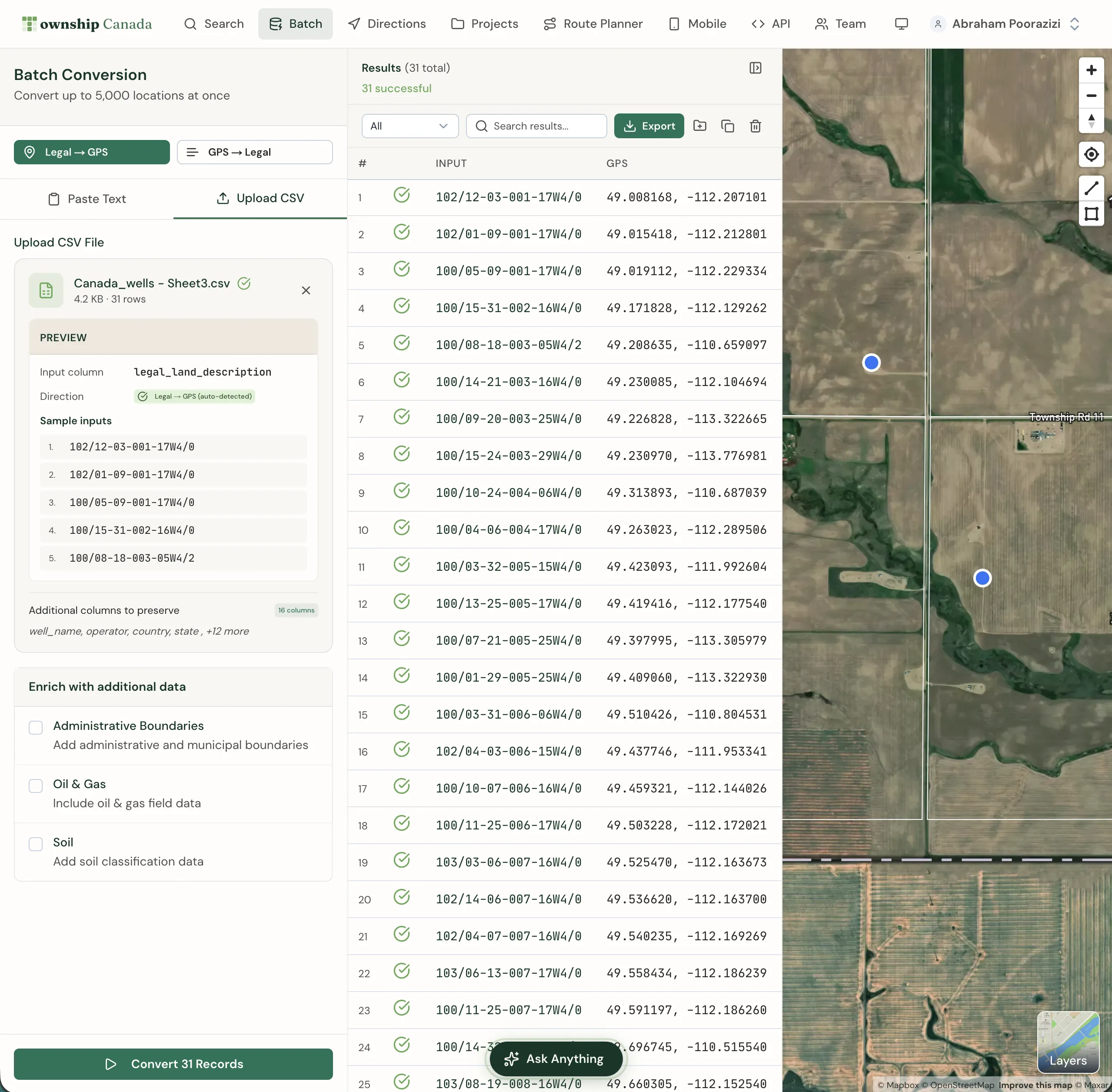
The OWA contractor receives a spreadsheet of well licences. Upload the full list to Township Canada's batch converter. The converter returns GPS coordinates for every valid entry and flags any that don't resolve. Entries with data quality issues - missing meridians, impossible township-range combinations - are identified immediately.
This validation step takes seconds for 50 wells. Done manually, it takes hours - and still misses errors that a programmatic check would catch.
Step 2: Map and Cluster
With coordinates for all sites, the contractor maps the full work package. Orphan wells in the same township or range can be grouped for a single mobilization. Sites that are geographic outliers can be scheduled separately or combined with another contractor's campaign in that area.
Export the coordinates as KML and load them into Google Earth or any GIS platform to visualize the project footprint. The geographic clustering that informs the mobilization plan is visible at a glance.
Step 3: Route the Field Crew
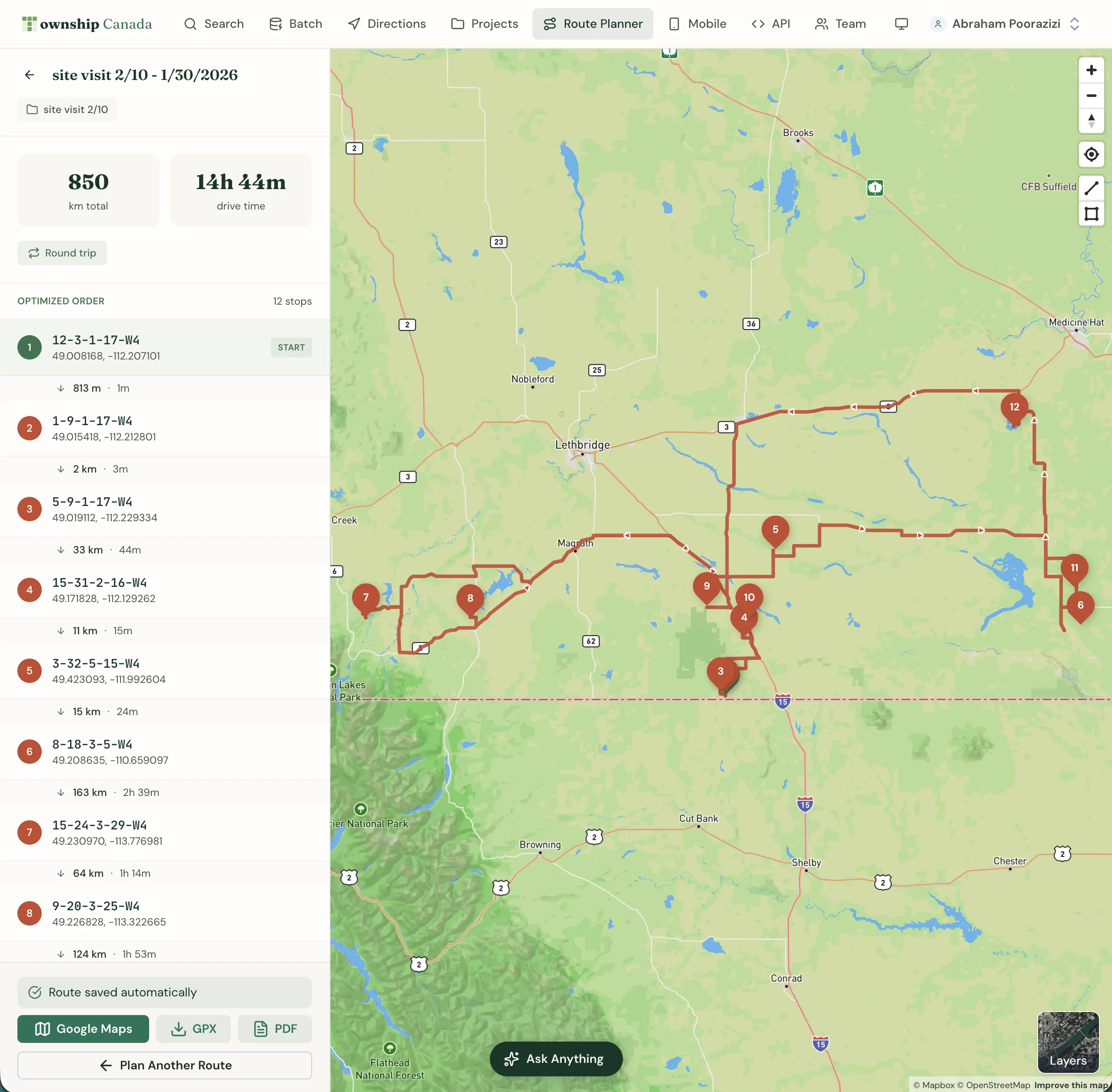
For a week of field inspections covering 12 orphan sites across Townships 42 to 45, Range 2-4 W5M, enter the LSDs into the route planner. The tool calculates the most efficient driving sequence and provides turn-by-turn directions on range roads and township roads. Export the route to a mobile device for real-time navigation.
An optimized route across 12 sites in a 50-kilometre radius can save two to three hours of driving compared to visiting sites in spreadsheet order. Over a season of orphan well inspections, that time adds up.
Step 4: Export for OWA Reporting
OWA contractors report on completed work using location data in multiple formats. The abandonment report references the well by LSD. The environmental assessment includes GPS coordinates and GIS files. The reclamation certificate application needs site boundaries.
Convert the project sites once, export as CSV, KML, and Shapefile (Business plan) and PDF (Pro and above), and the reporting package has consistent location data across every document.
Batch Conversion vs. One-at-a-Time
A single orphan well lookup is straightforward - enter the LSD, get coordinates. But orphan well work rarely involves a single site. The typical scope is 20 to 100 sites per project.
At five minutes per manual conversion (including verification), a 50-site project takes four hours of LSD lookup work. That's half a workday spent on data entry before any field planning begins.
Batch conversion reduces that to minutes. Upload the CSV, download the results, move on to field planning. The time savings are immediate and measurable from the first project.
What You Need from a DLS Tool for Orphan Well Work
The requirements are specific to the workflow:
- Batch processing: 50 to 200 LSDs at a time, not one-by-one
- Validation: Flag entries that don't resolve - the data quality in orphan well files is often poor
- Route planning: Multi-site campaigns need optimized driving sequences
- Multi-format export: CSV for project management, KML for visualization, Shapefile for GIS
- Team access: Multiple crew coordinators on the same account
Township Canada's Business plan covers all of these. For contractors managing OWA work packages, the batch converter and route planner pay for themselves on the first project.
Start with a free conversion to see how it works, then move to the Business plan when you're ready to process a full work package.