
By Township Canada
ArcGIS Pro Migration: Working with Legal Land Descriptions After ArcMap
ArcMap retired March 2026. Here's how to restore DLS and NTS legal land description search and batch geocoding in ArcGIS Pro.
Your ArcMap project had a custom DLS locator. It batch-geocoded well inventories, resolved quarter sections from the search bar, and sat behind half the map products your team delivered. Then Esri retired ArcMap in March 2026, and you opened ArcGIS Pro to find that none of it works.
The .loc file won't import. The Locate pane doesn't recognize DLS notation. A search for "NE 14-032-21W4" returns nothing - not an error, just silence. Your legal land description workflows didn't migrate. They disappeared.
This is happening right now at O&G companies, survey firms, and provincial agencies across Western Canada. ArcMap's retirement isn't a future event - it's a current one, and the gap it leaves in Canadian GIS workflows is wider than most teams expected.
What "Retired Support" Means for Your DLS Workflows
Esri moved ArcMap to "retired" status on March 1, 2026. No more patches, no security updates, no technical support. Existing installations still run, but any organisation with an IT policy around supported software is on a deadline to migrate.
The migration itself is technically straightforward for most workflows. ArcGIS Pro imports .mxd projects, preserves layer symbology, and handles most geoprocessing tools without issue. But DLS and NTS legal land descriptions fall through the cracks - ArcGIS Pro has never supported them natively, and version 3.7 ships NATRF2022 datum support but still has no native DLS/NTS locator.
If your ArcMap workflow depended on Canadian legal land descriptions at any point - search, geocoding, batch conversion - you have a gap to fill.
Three Things That Break After Migration
Custom DLS Locators
ArcMap users who built composite address locators for DLS conversion will find those .loc files incompatible with ArcGIS Pro. The locator format changed in ArcGIS Pro 2.x and the old files simply don't load. You'll see a "locator is not compatible" error, and there's no conversion path.
This affects any team that invested time building a DLS-aware locator - and there are a lot of them. It was one of the most common workarounds for ArcMap's lack of native DLS support.
Batch Geocoding Tables
If your ArcMap project batch-geocoded a table of DLS or LSD descriptions - common for well inventories, pipeline crossing lists, and mineral rights spreadsheets - that workflow fails at two points. The locator file won't import, and ArcGIS Pro's built-in geocoders don't recognize DLS notation as a valid address type. The source data is intact; you just can't re-geocode it.
Silent Search Failures
When you open a migrated .mxd in ArcGIS Pro, it converts to an .aprx project. Layers and symbology survive. But anything that depended on a DLS locator stops working without warning. Type SW-25-24-1-W5 into the Locate pane - nothing comes back. No error message, just empty results.
For teams that relied on search-bar lookups for daily tasks like verifying well locations or checking quarter section boundaries, this is the most disorienting part of the migration.
Restoring DLS and NTS Search in ArcGIS Pro
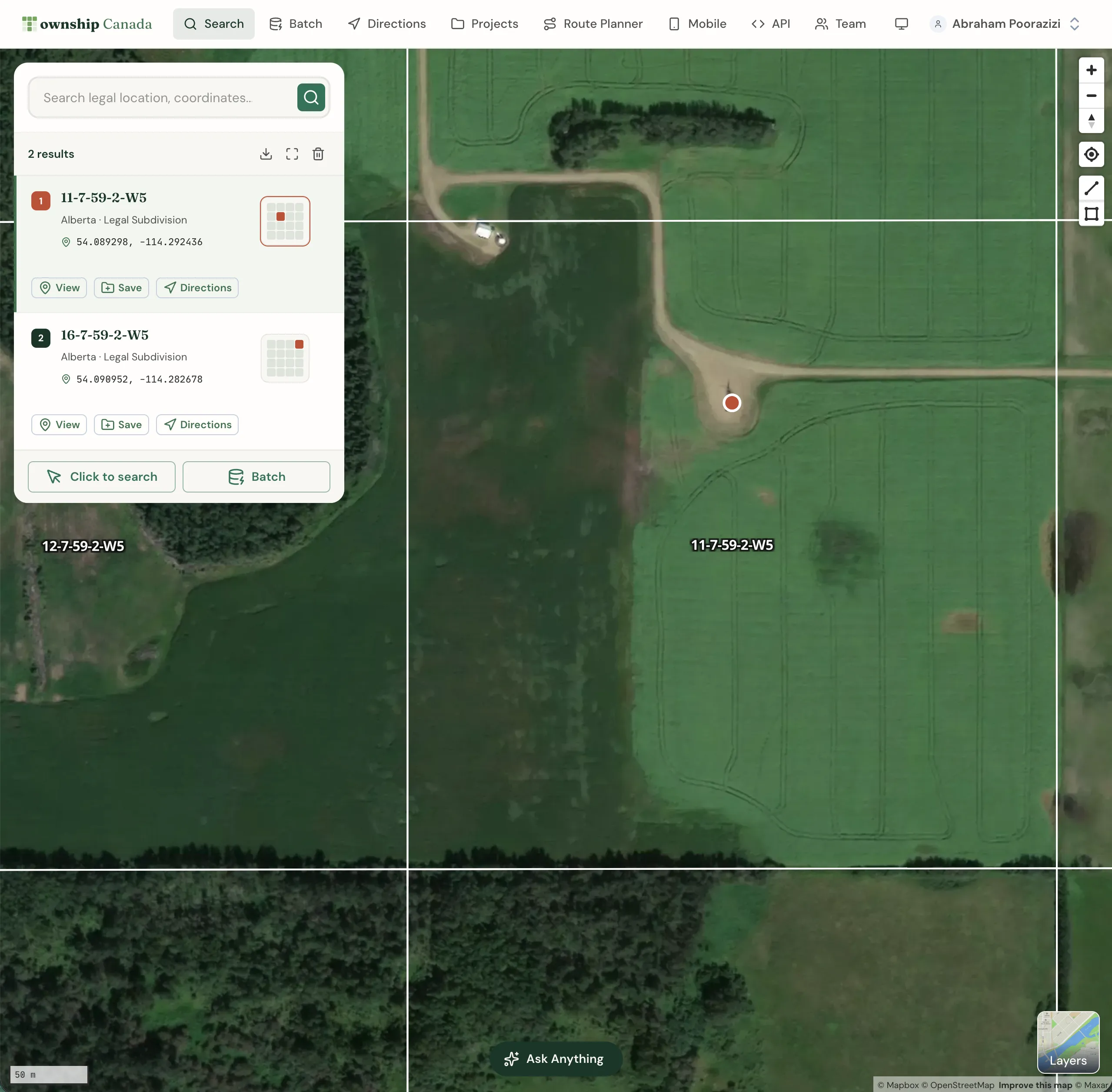
Township Canada ships an ArcGIS Pro Python toolbox that restores - and improves on - the DLS and NTS functionality that ArcMap users lost. The toolbox (TownshipCanada.pyt) installs as a standard ArcGIS Pro toolbox and adds two core capabilities:
Search bar locator. Type any DLS or NTS legal land description into the ArcGIS Pro Locate pane - LSD 06-32-048-07W5, NE 14-032-21W4, NTS 093P09 - and it resolves to GPS coordinates and zooms the map to the parcel. This replaces the custom locator files that ArcMap users built and maintained.
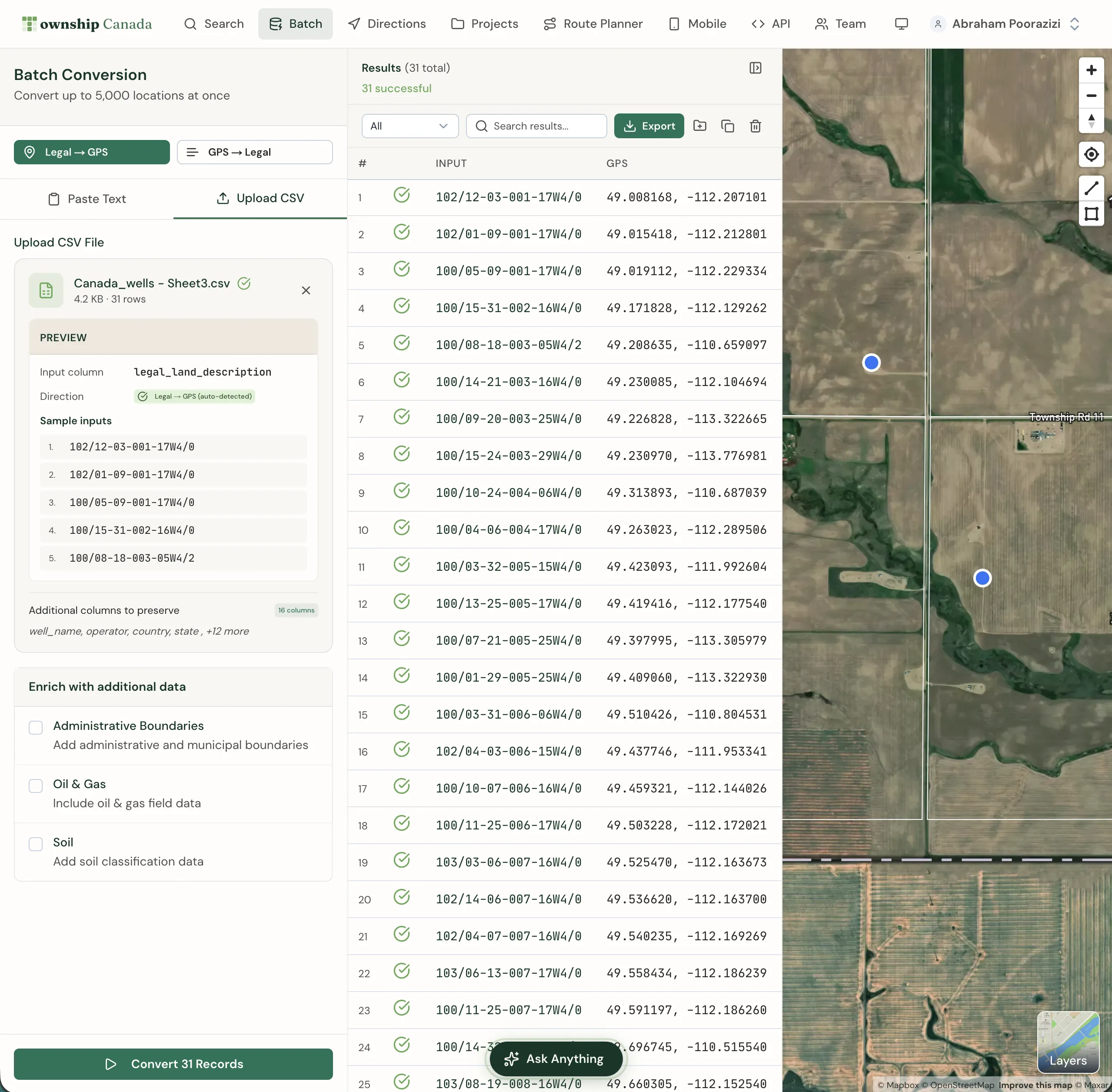
Batch geoprocessing tool. Point the tool at a table column containing legal land descriptions, and it converts every row to a point feature class with coordinates, province, and survey system as attributes. Optionally, it generates boundary polygons - one per quarter section or LSD - so you get actual parcel geometry, not just centre points.
The toolbox handles DLS, LSD, NTS, and FPS grid references in the same batch run. No need to separate files by survey system before processing.
Installation: Five Minutes to a Working Locator
- Get a Township Canada API key. Sign up at the API portal. The Build plan covers 1,000 requests/month; the Scale plan covers 10,000 - enough for most batch jobs. See pricing.
- Download
TownshipCanada.pytfrom the ArcGIS Marketplace. - Add the toolbox. In ArcGIS Pro, open the Catalog pane, right-click Toolboxes, select Add Toolbox, and browse to the
.pytfile. It appears immediately - no restart required. - Configure your API key. Enter the key in the toolbox properties. It persists across sessions in your ArcGIS Pro project settings.
After configuration, the Township Canada locator appears in the Locate pane alongside Esri's default geocoders. The batch tool is available in the Geoprocessing pane under the Township Canada toolbox.
Real Example: Migrating a 400-Well Inventory
A land technician at a mid-size E&P company has an ArcMap project with 400 well locations stored as LSD descriptions in a file geodatabase table. The geocoded results layer breaks after migration because the old .loc locator isn't recognized by ArcGIS Pro.
The fix:
- Open the geodatabase table in ArcGIS Pro (the data imports cleanly - the table isn't the problem)
- Run Township Canada Batch Convert from the Geoprocessing pane
- Select the LSD column as the input field
- Set the output location in the geodatabase
- Run the tool
Output: a point feature class with all 400 wells plotted by GPS coordinates, plus a second polygon feature class with the LSD boundaries. Each feature carries the original legal land description, latitude, longitude, province, and survey system as attributes.
That's the kind of job that used to require rebuilding a custom locator, verifying it against test data, and hoping the .mxd conversion hadn't dropped any table joins. With the toolbox, it's a five-minute geoprocessing step.
Reverse Geocoding: GPS Coordinates Back to DLS
ArcMap users who did field-to-office workflows - collecting GPS coordinates in the field, then determining the DLS description for regulatory filings - can replicate this in ArcGIS Pro through the Township Canada API's reverse geocode. Pass latitude and longitude, get back the legal land description for that location.
This matters for AER well licence applications, where the filing requires the LSD notation even though the field crew collected coordinates with a GPS receiver. The ArcGIS Pro locator guide covers the reverse geocoding setup.
Beyond Desktop: ArcGIS Online and Field Teams
Not every migration target is ArcGIS Pro desktop. Some teams are moving map-based workflows to ArcGIS Online - especially field operations that need browser or tablet access.
Township Canada includes an Experience Builder widget for ArcGIS Online that adds legal land description search with autocomplete to any web map experience. A pipeline integrity crew checking well locations on a tablet can type an LSD and see it highlighted on the satellite basemap. There's also a Survey123 integration: when a field worker enters a DLS description in a Survey123 form, the integration auto-converts it to GPS coordinates and updates the feature layer.
For a full comparison of desktop vs. web capabilities, see ArcGIS Doesn't Support Canadian Legal Land Descriptions - Here's What GIS Professionals Use Instead.
Handling the Transition Period
Some organisations are running ArcMap and ArcGIS Pro in parallel during the transition. The Township Canada toolbox works independently of any ArcMap configuration - it doesn't need the old .loc files and won't conflict with existing setups. You can test it on a copy of your production project before committing to the full switch.
For teams that need batch results in formats beyond geodatabase feature classes - CSV, KML, GeoJSON, or Shapefile - the Township Canada batch converter handles those exports through the web interface.
Getting Your Team Moved Over
The ArcMap to ArcGIS Pro migration guide walks through the full process: what breaks, what carries over, and the exact steps to restore legal land description search and batch geocoding in ArcGIS Pro.
ArcMap served Canadian GIS professionals well for two decades. ArcGIS Pro is a better platform in most respects - faster rendering, 3D support, better project management. The one thing it doesn't do is recognize DLS and NTS legal land descriptions. The Township Canada toolbox fixes that, and it takes five minutes to install.
Try it now - enter LSD 06-32-048-07W5 to see the coordinates and boundary polygon the ArcGIS Pro locator returns for a 40-acre parcel near Rocky Mountain House, Alberta.