By Township Canada
Batch Conversion for Well Closure Regulatory Filings
How to prepare Directive 013 and Directive 079 submissions faster with batch DLS-to-GPS conversion. Export closure site coordinates as CSV, KML, and Shapefile in one step.
Every AER closure filing references a well by its legal land description. Directive 013 abandonment applications, Directive 079 reclamation certificates, environmental site assessments - they all require the site's LSD, GPS coordinates, and often a location map in KML or Shapefile format. For a single well, that's a few minutes of work. For a closure company processing 30 or 40 wells in a quarter, the conversion and export step becomes a bottleneck.
Batch conversion eliminates that bottleneck. Upload a CSV of closure site LSDs, get GPS coordinates and export files for the entire list, and move straight to filing.
What AER Filings Require
Directive 013: Suspension and Abandonment
A Directive 013 application requires:
- The well location in DLS notation (LSD-Section-Township-Range-Meridian)
- GPS coordinates in the application form
- A location map showing the well site relative to surrounding survey grid
For a single abandonment, the location data takes minutes to prepare. For a batch of 35 wells from an acquired licence portfolio, it takes most of a day if done manually - looking up each LSD individually, copying coordinates, generating a map for each site.
Directive 079: Surface Reclamation
A Directive 079 reclamation certificate application requires:
- Site location in DLS notation
- GPS coordinates
- A site plan showing the reclaimed area (typically as KML or Shapefile)
- Supporting maps for the vegetation assessment and soil analysis
The GIS deliverables are where the export step matters most. The environmental consultant needs the site boundary in a format their mapping software can import. Converting an LSD to a KML file or Shapefile one at a time is slow. Batch-converting the full project inventory and exporting all formats at once is fast.
Environmental Site Assessments
Phase I and Phase II ESAs reference the site by LSD and include:
- GPS coordinates for the site centroid
- A site location figure (often exported as PDF or KML)
- Sampling locations within the site boundary
For a consulting firm managing 45 remediation sites, preparing the location data for each ESA report is a significant administrative task. Batch conversion produces the coordinates and export files for all 45 sites in one step.
The Batch Conversion Workflow
Step 1: Prepare the Input
Start with a CSV or spreadsheet of closure site locations. Each row should contain a legal land description in standard DLS notation:
10-33-037-04W5
06-18-039-05W5
14-07-040-04W5
NE-22-041-06W5
02-31-038-05W5
Township Canada accepts multiple DLS formats - LSD-Section-Township-Range-Meridian, Quarter-Section-Township-Range-Meridian, and UWI formats with or without slashes. The parser handles variations in spacing and separators.
Step 2: Upload and Convert
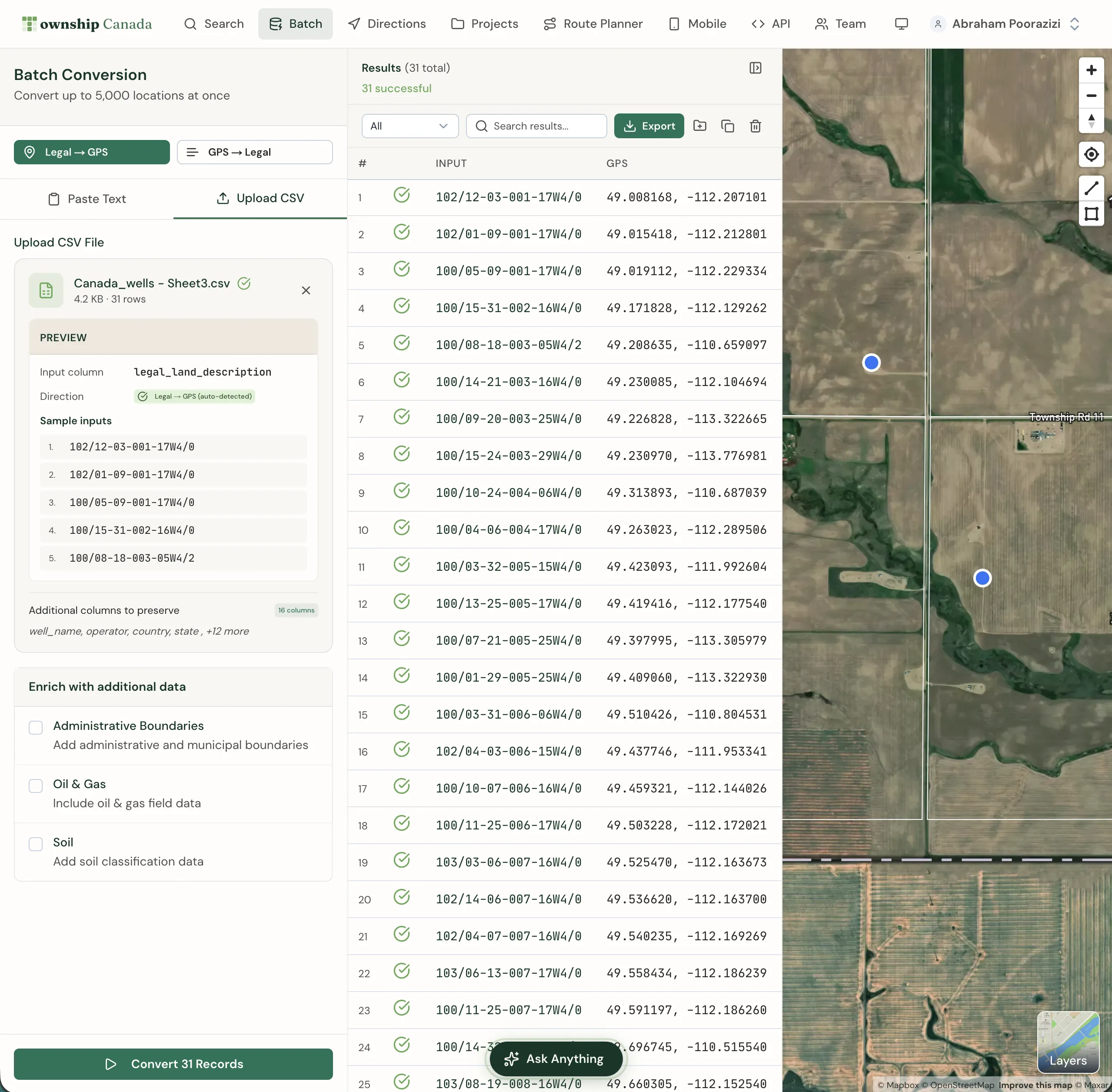
Go to the batch converter and upload the CSV. Township Canada processes the full list and returns:
- GPS coordinates (latitude and longitude) for every valid entry
- Validation flags for entries that don't resolve - wrong meridians, out-of-range townships, missing data
- A map view showing all converted sites
For a list of 200 closure sites, processing takes seconds. The validation step alone justifies the batch approach: entries with data quality issues are identified before they propagate into regulatory filings.
Step 3: Export
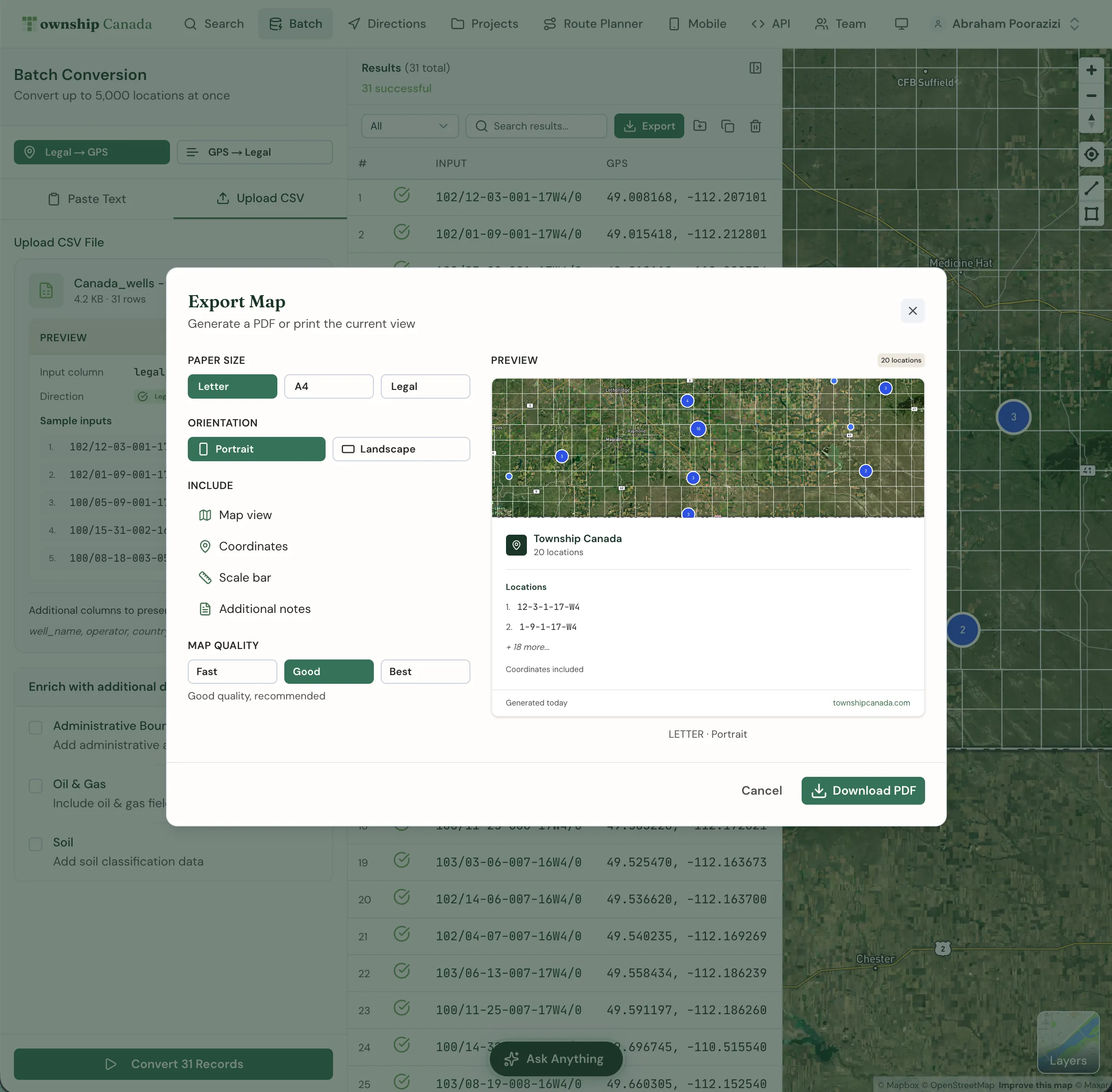
Download the results in the formats your filings need:
- CSV: Coordinates for application forms and internal tracking
- KML: Site maps for Google Earth and AER submission packages
- Shapefile: GIS layers for environmental consultants and engineering teams
- GeoJSON: Web mapping and data analysis
- DXF: CAD engineering drawings
- PDF: Printed site plans for field binders and regulatory submissions
One conversion, six formats. No re-entering coordinates for each document type.
Real-World Example: 35-Well Abandonment Campaign
A closure company in Red Deer acquires 35 wells from an inactive licensee. The regulatory coordinator needs to prepare Directive 013 applications for all 35.
Without batch conversion:
- Look up each LSD individually - 5 minutes per site = 3 hours
- Copy coordinates into each application form - 2 minutes per site = 1 hour
- Generate a KML file for each site map - 3 minutes per site = 1.5 hours
- Create Shapefiles for the environmental consultant - 3 minutes per site = 1.5 hours
- Total: ~7 hours of location data preparation
With batch conversion:
- Upload CSV of 35 LSDs - 30 seconds
- Review validation results, fix any flagged entries - 5 minutes
- Download CSV export - coordinates for all 35 application forms - 10 seconds
- Download KML export - site maps for all 35 submissions - 10 seconds
- Download Shapefile export - GIS layers for the consultant - 10 seconds
- Total: ~6 minutes
The time difference is not incremental. It's a full working day reclaimed for every batch filing cycle.
Validation Catches Filing Errors
The most expensive errors in AER filings are location errors. A wrong meridian, a transposed township number, or a missing LSD digit creates a discrepancy between the application and the actual well site. The AER's review process catches these - but the correction cycle can add time to the filing timeline.
Batch conversion with validation catches these errors at the data entry stage:
- Wrong meridian: The converter flags LSDs where the meridian-range combination doesn't exist in the DLS grid
- Out-of-range values: Township numbers above the valid range for a given meridian, or LSD numbers outside 1-16
- Incomplete entries: Missing meridian designations, truncated township numbers, ambiguous formatting
Fixing data quality issues before filing is faster and cheaper than correcting them after the AER returns the application.
Who Benefits Most
Closure companies processing batches of 10 to 200 wells per quarter. The time savings on location data preparation compound with every filing cycle.
Environmental consultants managing multi-site remediation programs. Batch conversion produces the coordinates and GIS files needed for Phase I/II reports and reclamation applications.
OWA contractors handling orphan well work packages. The validation step is particularly valuable for legacy well data where location accuracy is often poor.
Land administrators maintaining well databases and preparing acquisition due diligence packages. Batch conversion verifies that every LSD in an acquisition spreadsheet resolves to a valid location.
Getting Started
Individual site lookups are free - enter any LSD and get GPS coordinates instantly.
Batch conversion, multi-format export, and team access are available on the Business plan. No per-conversion fees, no export limits.
Upload your next closure inventory to the batch converter and measure the time difference yourself.